

AB-730 sample exam questions
15 exam-style questions for Microsoft AB-730: AI Business Professional, with answers and explanations. Take them as a timed practice exam first if you want a score out of 1000.
- A colleague from another company shares a link to a prompt.
When you select the link, you receive the following response: "Prompt not found. Sorry, it looks like the prompt is no longer available."
What is a possible cause of the response?- AThe prompt is outdated.
- BThe prompt is outside of your organization.
- CThe prompt contains a reference to a file that you do NOT have access to.
- DThe prompt is a scheduled prompt.
- EThe prompt contains a file that has a sensitivity label applied.
Show answer
Correct answer: B
WhySharing a prompt by link only works inside the same organization. A colleague at another company gives you a link outside your tenant, so Copilot reports the prompt as not found. Outdated, scheduled, or labeled-file prompts do not produce this message.
- A
- HOTSPOT
For each of the following statements, select Yes if the statement is true. Otherwise, select No.
NOTE: Each correct selection is worth one point.
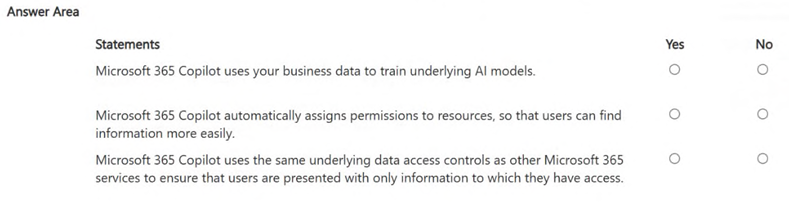
Microsoft 365 Copilot uses your business data to train underlying AI models. Yes / No Microsoft 365 Copilot automatically assigns permissions to resources, so that users can find information more easily. Yes / No Microsoft 365 Copilot uses the same underlying data access controls as other Microsoft 365 services to ensure that users are presented with only information to which they have access. Yes / No Show answer
- Microsoft 365 Copilot uses your business data to train underlying AI models. No
- Microsoft 365 Copilot automatically assigns permissions to resources, so that users can find information more easily. No
- Microsoft 365 Copilot uses the same underlying data access controls as other Microsoft 365 services to ensure that users are presented with only information to which they have access. Yes
WhyPrompts, responses and Graph data are not used to train foundation models. Copilot never grants or changes permissions; it only respects the access a user already has, using the same controls as other Microsoft 365 services, so oversharing must be fixed separately.
- You use the Researcher agent in Microsoft 365 Copilot to generate a report.
What can you use to verify whether the report was generated by using valid sources?- Acitations
- Binstructions
- Cmemory
- Dcapabilities
Show answer
Correct answer: A
WhyResearcher responses include citations that link to the sources used, so you can open them and verify validity. Instructions, memory, and capabilities describe how an agent is configured or personalized, not the origin of facts in a report.
- A
- You ask Microsoft 365 Copilot to create a report based on information from the web.
You verify the response and discover that some information is fictional.
What is this an example of?- Adeepfake
- Bfabrication
- Coverreliance
- Dprompt injection
- Ebias
Show answer
Correct answer: B
WhyInformation that sounds plausible but is invented is fabrication, also called a hallucination. A deepfake is synthetic media imitating a person, overreliance is trusting output without checking, prompt injection is malicious input, and bias is unfair skew in output.
- A
- You have several pages in Microsoft 365 Copilot related to the research you are doing for a new product.
You need to simplify your ability to have many different Copilot conversations about the pages.
What should you do first?- ACreate a story.
- BAdd the pages to a notebook.
- CAdd the pages to a conversation.
- DDownload the pages locally.
Show answer
Correct answer: B
WhyA notebook gathers pages, files, and other references in one place and lets you hold many different Copilot conversations grounded on that shared material. Adding pages to a single conversation or downloading them does not give that reusable multi-chat workspace, and stories are not a Copilot feature here.
- A
- You need to improve prompt-grounding during a Microsoft 365 Copilot conversation.
What is the best approach to achieve the goal? More than one answer choice may achieve the goal. Select the BEST answer.- AUse shorter prompts.
- BProvide the desired output format.
- CAvoid technical jargon.
- DReference specific files.
Show answer
Correct answer: D
WhyGrounding is improved by pointing Copilot to specific files or sources, using the / file reference, so answers draw on real content. Shorter prompts, avoiding jargon, and specifying output format affect clarity or style but do not tie the answer to your data.
- A
- HOTSPOT
Select the answer that correctly completes the sentence.
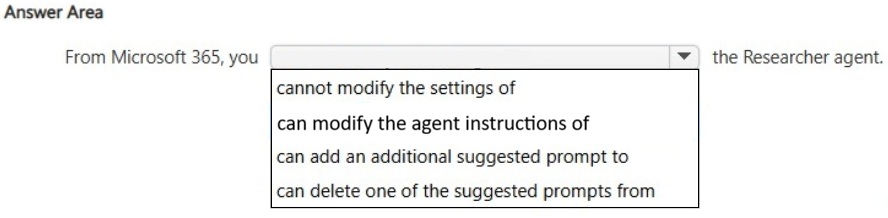
From Microsoft 365, you ___ the Researcher agent. cannot modify the settings of / can modify the agent instructions of / can add an additional suggested prompt to / can delete one of the suggested prompts from Show answer
- From Microsoft 365, you ___ the Researcher agent. cannot modify the settings of
WhyResearcher is a prebuilt, Microsoft-managed agent, so users cannot edit its instructions, suggested prompts, or other settings. To get customized behavior, you would build your own agent in Copilot Studio or the agent builder instead.
- HOTSPOT
Select the answer that correctly completes the sentence.
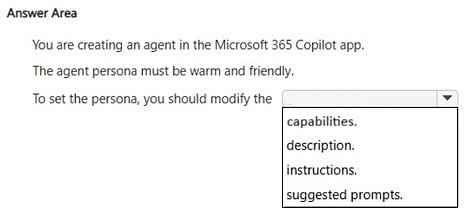
To set the persona, you should modify the ___ capabilities. / description. / instructions. / suggested prompts. Show answer
- To set the persona, you should modify the ___ instructions.
WhyInstructions tell an agent how to behave, including its tone, persona, and rules, so a warm and friendly style belongs there. The description only summarizes the agent's purpose, capabilities add features, and suggested prompts offer users starting questions.
- You receive the following response to a prompt: “Sorry, it looks like I can’t respond to this. Let’s try a different topic.”
What is a possible cause of the response?- AThe prompt is too vague to illicit a response.
- BThe prompt contains language that violates safety guidelines.
- CThe prompt contains more than five requests.
- DThe prompt is larger than the allowed context window.
Show answer
Correct answer: B
WhyThis canned refusal appears when Copilot's responsible AI safety filters flag the prompt as violating content guidelines. A vague prompt gets a clarification or generic answer, and there is no five-request limit. Exceeding the context window gives a different length-related message.
- A
- What is the purpose of adding custom instructions in Microsoft 365 Copilot?
- Ato set preferences that are applied to all Copilot interactions, such as the tone and style of responses
- Bto enable Copilot to take actions on your behalf, such as sending emails
- Cto apply security rules that must be followed by Copilot, such as which information is shared
- Dto provide additional context to Copilot, such as your name, title, and company, so that Copilot can complete tasks more efficiently
Show answer
Correct answer: A
WhyCustom instructions let you set standing preferences, such as tone, style, and format, that Copilot applies to every conversation. Actions on your behalf come from agents and plugins, security rules come from admin policies, and personal details like name and role are only part of the optional about-you section.
- A
- In a Microsoft 365 Copilot conversation, you generate a report, and then edit the report in a page.
You need to collaborate with a colleague on the report.
What are two ways to achieve the goal? Each correct answer presents a complete the solution.
NOTE: Each correct selection is worth one point.- AMention the colleague in the page.
- BOpen the page in Microsoft Word.
- CShare the page link.
- DAdd the page to a notebook.
Show answer
Correct answer: A, C
WhyA page is collaborative, so you can mention the colleague in it with an at-mention or share the page link. Opening in Word does not itself involve a colleague, and adding the page to a notebook organizes reference material rather than sharing it.
- A
- You use Microsoft 365 Copilot to create a proposal in Microsoft Word based on a document in a Microsoft SharePoint library.
You need to ensure that the information cited in the proposal is accurate.
What is the best approach to achieve the goal? More than one answer choice may achieve the goal. Select the BEST answer.- AManually verify the citations in the generated content.
- BUse Copilot in Word to verify the citations.
- CCreate an agent that contains your organization's editorial standards and use the agent to verify the citations.
- DCreate a notebook that contains all the reference material and use the notebook to verify the citations.
Show answer
Correct answer: A
WhyCopilot can still fabricate or misattribute, so the dependable way to ensure accuracy is to manually open and check the cited sources against the original document. Copilot, agents, or notebooks verifying their own output cannot replace human review.
- A
- HOTSPOT
You are a business user who uses Microsoft 365 apps and services, including Microsoft Teams. You have a work account.
You want to use Microsoft 365 Copilot to help with meetings.
For each of the following statements, select Yes if the statement is true. Otherwise, select No.
NOTE: Each correct selection is worth one point.
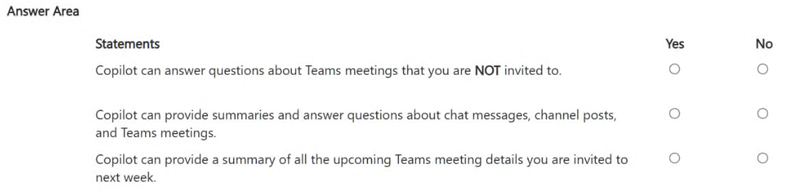
Copilot can answer questions about Teams meetings that you are NOT invited to. Yes / No Copilot can provide summaries and answer questions about chat messages, channel posts, and Teams meetings. Yes / No Copilot can provide a summary of all the upcoming Teams meeting details you are invited to next week. Yes / No Show answer
- Copilot can answer questions about Teams meetings that you are NOT invited to. No
- Copilot can provide summaries and answer questions about chat messages, channel posts, and Teams meetings. Yes
- Copilot can provide a summary of all the upcoming Teams meeting details you are invited to next week. Yes
WhyCopilot respects your permissions through Microsoft Graph, so it only reaches meetings you can access and cannot answer about meetings you were not invited to. Within that access, it can summarize chats, channel posts, meetings, and upcoming calendar events.
- HOTSPOT
For each of the following statements, select Yes if the statement is true. Otherwise, select No.
NOTE: Each correct selection is worth one point.
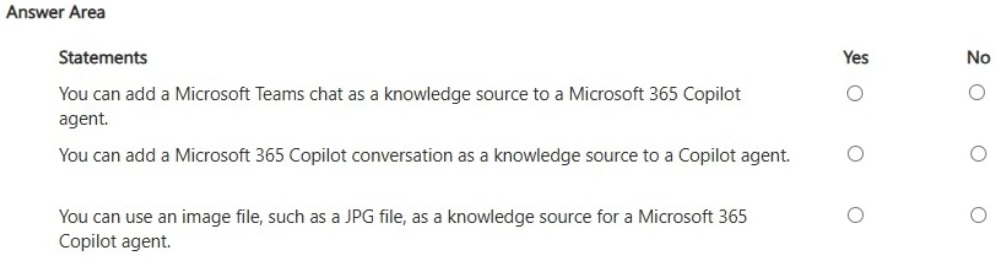
You can add a Microsoft Teams chat as a knowledge source to a Microsoft 365 Copilot agent. Yes / No You can add a Microsoft 365 Copilot conversation as a knowledge source to a Copilot agent. Yes / No You can use an image file, such as a JPG file, as a knowledge source for a Microsoft 365 Copilot agent. Yes / No Show answer
- You can add a Microsoft Teams chat as a knowledge source to a Microsoft 365 Copilot agent. Yes
- You can add a Microsoft 365 Copilot conversation as a knowledge source to a Copilot agent. No
- You can use an image file, such as a JPG file, as a knowledge source for a Microsoft 365 Copilot agent. No
WhyAgent knowledge can include Teams chats alongside sources such as SharePoint, email, and documents. Copilot conversations are not a selectable source, and knowledge files are text-based formats such as Word, PowerPoint, Excel, and PDF. Supported sources change, so check current documentation.
- You join an internal Microsoft Teams meeting late and want to catch up on what you missed. The meeting is being recorded.
You need to summarize the portion of the meeting that you missed as soon as possible.
What is the best approach to achieve the goal? More than one answer choice may achieve the goal. Select the BEST answer.- AFrom the Teams app, ask Copilot in Teams to summarize what you missed so far.
- BFrom the meeting, read the transcript.
- CFrom the Microsoft 365 Copilot app, ask Copilot to tell you what you missed.
- DFrom the Teams app, view the intelligent recap.
Show answer
Correct answer: A
WhyCopilot in Teams can summarize the meeting so far while it is in progress, which is the fastest way to catch up. The transcript is slow to read, the Microsoft 365 Copilot app lacks live meeting context, and the intelligent recap is available only after the meeting ends.
- A