

AZ-140 sample exam questions
15 exam-style questions for Microsoft AZ-140: Azure Virtual Desktop, with answers and explanations. Take them as a timed practice exam first if you want a score out of 1000.
- You have an Azure subscription that contains 500 users. The users are assigned Microsoft Office 365 E1 licenses.
You deploy an Azure Virtual Desktop solution that contains Windows 10 multi-session hosts and streams a custom remote app named App1.
You need to ensure that the users are licensed to stream App1. The solution must minimize costs.
Which license should you use?- AMicrosoft 365 E5
- BOffice 365 E3
- Ca Remote Desktop Services (RDS) client access license (CAL)
- DWindows 10 Enterprise E3
Show answer
Correct answer: D
WhyStreaming apps from Windows 10 multi-session requires a Windows per-user license such as Windows 10 Enterprise E3. Office 365 E1 does not include Windows rights, while Microsoft 365 E5 costs more, and an RDS CAL is not needed for Azure Virtual Desktop with eligible Windows licenses.
- A
- Note: This question is part of a series of questions that present the same scenario. Each question in the series contains a unique solution that might
meet the stated goals. Some question sets might have more than one correct solution, while others might not have a correct solution.
After you answer a question in this section, you will NOT be able to return to it. As a result, these questions will not appear in the review screen.
You have an Azure Virtual Desktop host pool that contains five session hosts. The session hosts run Windows 10 Enterprise multi-session.
You need to prevent users from accessing the internet from Azure Virtual Desktop sessions. The session hosts must be allowed to access all the required
Microsoft services.
Solution: You configure rules in the network security group (NSG) linked to the subnet of the session hosts.
Does this meet the goal?- AYes
- BNo
Show answer
Correct answer: A
WhyAn NSG on the session host subnet can deny outbound internet traffic while allowing the WindowsVirtualDesktop, AzureMonitor and other Microsoft service tags. This blocks general internet access yet permits required services, so the solution meets the goal.
- A
- HOTSPOT
You have an Azure subscription that contains a user named User1.
The subscription uses the Azure Virtual Desktop host pools shown in the following table.

You need to ensure that User1 can create RemoteApp app groups that will be used to stream a suite of custom apps from the host pools. The solution must meet the following requirements:
• The apps must be available to the users in all the pools.
• The principle of least privilege must be followed.
• Administrative effort must be minimized.
Which role should you assign to User1, and what is the minimum number of app groups that User1 should create? To answer, select the appropriate options in the answer area.
NOTE: Each correct selection is worth one point.
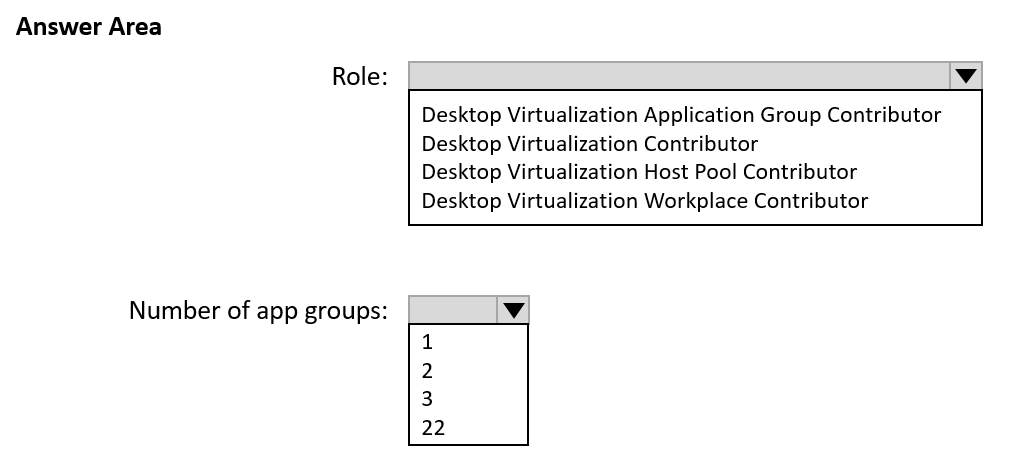
Role: Desktop Virtualization Application Group Contributor / Desktop Virtualization Contributor / Desktop Virtualization Host Pool Contributor / Desktop Virtualization Workplace Contributor Number of app groups: 1 / 2 / 3 / 22 Show answer
- Role: Desktop Virtualization Application Group Contributor
- Number of app groups: 3
WhyDesktop Virtualization Application Group Contributor is the least-privileged role for creating app groups. Each app group is linked to exactly one host pool, so all three pools need one RemoteApp group each. Personal host pools now support RemoteApp too; older answers that leave out Pool3 are outdated.
- HOTSPOT
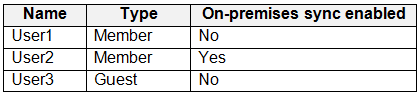
You have a Microsoft Entra hybrid tenant that contains the users shown in the following table.
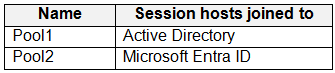
You have an Azure Virtual Desktop deployment that contains the host pools shown in the following table.
Which users can sign in to the session hosts of each pool? To answer, select the appropriate options in the answer area.
NOTE: Each correct selection is worth one point.
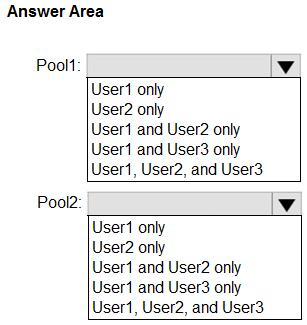
Pool1: User1 only / User2 only / User1 and User2 only / User1 and User3 only / User1, User2, and User3 Pool2: User1 only / User2 only / User1 and User2 only / User1 and User3 only / User1, User2, and User3 Show answer
- Pool1: User2 only
- Pool2: User1 and User2 only
WhyAD DS-joined session hosts need hybrid identities synced from AD DS, so only User2 can sign in. Entra-joined hosts accept cloud-only and hybrid member users. External (guest) identities on Entra-joined hosts were added later in preview, so newer guidance may differ for User3.
- You deploy multiple Azure Virtual Desktop session hosts that have only private IP addresses.
You need to ensure that administrators can initiate an RDP session to the session hosts by using the Azure portal.
What should you implement?- ARemote Desktop Connection Broker (RD Connection Broker)
- BAzure Application Gateway
- CAzure Bastion
- DRemote Desktop Session Host (RD Session Host)
Show answer
Correct answer: C
WhyAzure Bastion provides browser-based RDP from the Azure portal to VMs that have only private IP addresses. Connection Broker and Session Host are RDS roles, and Application Gateway is a web load balancer, not an RDP access service.
- A
- HOTSPOT
You plan to deploy Azure Virtual Desktop.
Users have the devices shown in the following table.
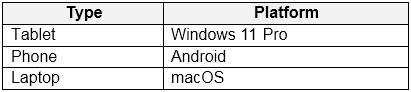
From which device types can the users connect to Azure Virtual Desktop resources by using the Windows app and the Remote Desktop web client? To answer, select the appropriate options in the answer area.
NOTE: Each correct selection is worth one point.
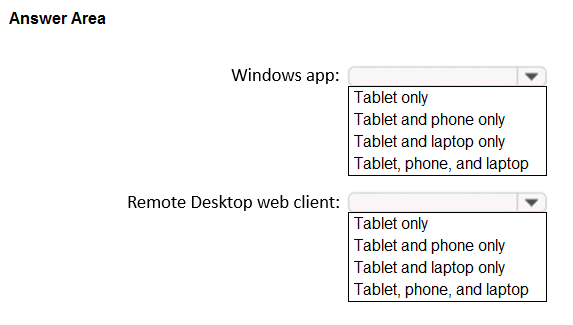
Windows app: Tablet only / Tablet and phone only / Tablet and laptop only / Tablet, phone, and laptop Remote Desktop web client: Tablet only / Tablet and phone only / Tablet and laptop only / Tablet, phone, and laptop Show answer
- Windows app: Tablet, phone, and laptop
- Remote Desktop web client: Tablet and laptop only
WhyWindows App is available on Windows, macOS, iOS/iPadOS and Android, so all three devices can use it. The web client runs in HTML5 browsers on Windows, macOS, Linux and ChromeOS, but mobile operating systems such as Android are not supported, which excludes the phone.
- You have an Azure Virtual Desktop host pool.
You add a French language pack to each session host in the host pool.
Several days later, users report that English displays when they connect to Azure Virtual Desktop.
After an investigation, you discover that the French language pack was removed, and the session hosts reverted to English.
You need to ensure that the French language pack is always available on the session hosts.
What should you do?- AConfigure the international settings on each host
- BAssign a default time zone on each host
- CApply a Group Policy setting to disable the Time & language settings
- DApply a Group Policy setting that blocks the cleanup of unused language packs
Show answer
Correct answer: D
WhyWindows removes unused language packs through a cleanup task, so the French pack disappears. Applying the Group Policy setting that blocks cleanup of unused language packs keeps it installed. Regional or time zone settings do not stop this removal.
- A
- HOTSPOT
You have an Azure subscription that contains an Azure Virtual Desktop host pool named Pool1 and a standard storage account named account1. Pool1 contains two session hosts and uses FSLogix profile containers. account1 contains an Azure Files share named share1 that stores the profile containers.
Users report that signing in to the session hosts is slow.
You need to reduce how long it takes to sign in to the session hosts. The solution must minimize administrative effort.
What should you do? To answer, select the appropriate options in the answer area.
NOTE: Each correct selection is worth one point.
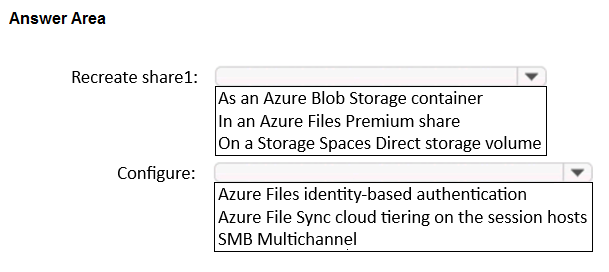
Recreate share1: As an Azure Blob Storage container / In an Azure Files Premium share / On a Storage Spaces Direct storage volume Configure: Azure Files identity-based authentication / Azure File Sync cloud tiering on the session hosts / SMB Multichannel Show answer
- Recreate share1: In an Azure Files Premium share
- Configure: SMB Multichannel
WhyA standard account cannot be converted, so the share must be recreated on Premium (SSD) storage for lower latency. SMB Multichannel, available on premium file shares, adds parallel connections and throughput, speeding profile loads with little administrative effort.
- You have an Azure Virtual Desktop deployment that contains a host pool named Pool1.
Pool1 contains a session host named Host1 that is Azure AD-joined.
You need to verify whether a Windows license is assigned to Host1.
What should you do?- AFrom the Azure Active Directory admin center, view the product licenses.
- BFrom VM1, run the Get-WindowsDeveloperLicense cmdlet.
- CFrom the Azure portal, view the properties of Host1.
- DFrom Azure Cloud Shell, run the Get-AzVm cmdlet.
Show answer
Correct answer: D
WhyThe Windows license type is a property of the Azure VM, so Get-AzVM in Cloud Shell shows LicenseType (for example Windows_Client). The Entra admin center lists user product licenses, not VM licensing, and Get-WindowsDeveloperLicense is unrelated.
- A
- DRAG DROP
You have an Azure subscription that contains a Bicep file named AVD.bicep.
You plan to use AVD.bicep to deploy Azure Virtual Desktop.
Which commands should you run in sequence? To answer, drag the appropriate commands to the correct order. Each command may be used once, more than once, or not at all. You may need to drag the split bar between panes or scroll to view content.
NOTE: Each correct selection is worth one point.
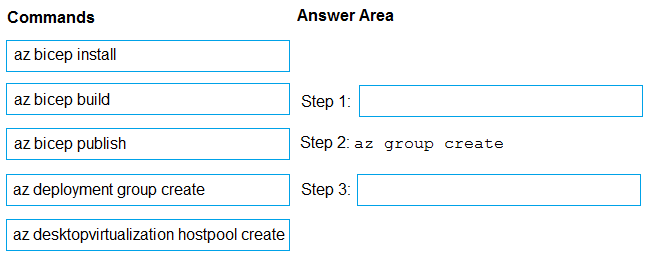
Move each item to the matching row:
- az bicep install
- az bicep build
- az bicep publish
- az deployment group create
- az desktopvirtualization hostpool create
- Step 1:
- Step 3:
Show answer
- Step 1: az bicep install
- Step 3: az deployment group create
WhyThe Bicep CLI must be installed first so Azure CLI can process the file. After az group create provides the target resource group, az deployment group create deploys AVD.bicep to it. Building to ARM JSON is unnecessary, and the hostpool command would ignore the Bicep file.
- Which setting should you modify for VNET4 before you can deploy Pool4?
- AService endpoints
- BAddress space
- CDNS servers
- DAccess control (IAM)
- EPeerings
Show answer
Correct answer: C
WhyVNET4 is new and holds domain-joined session hosts, so its DNS servers must be set to the domain controllers (as the other VNets use) to let hosts resolve and join contoso.com. Peering already exists, and service endpoints, address space and IAM are not the issue.
- A
- You need to modify the custom virtual machine images to meet the deployment requirements.
What should you install?- Athe RSAT: Remote Desktop Services Tools optional feature
- Bthe Azure Virtual Desktop Agent
- Cthe Microsoft Monitoring Agent
- Dthe FSLogix agent
Show answer
Correct answer: D
WhyThe custom images must support profile containers, so the FSLogix agent is installed on them. The AVD agent is installed during session host deployment through the registration process, and RSAT and the Monitoring Agent are not required.
- A
- Which two roles should you assign to Admin1 to meet the security requirements? Each correct answer presents part of the solution.
NOTE: Each correct selection is worth one point.- ADesktop Virtualization Host Pool Contributor
- BDesktop Virtualization Application Group Contributor
- CDesktop Virtualization Workspace Contributor
- DDesktop Virtualization Application Group Reader
- EUser Access Administrator
Show answer
Correct answer: C, D
WhyAdmin1 needs to view application groups and manage workspaces, matching the least-privilege requirement: Workspace Contributor lets them manage workspaces and Application Group Reader gives read-only access to app groups. Host pool contributor, app group contributor and User Access Administrator grant more than required.
- A
- You need to configure the device redirection settings. The solution must meet the technical requirements.
Where should you configure the settings?- AWorkspace1
- BMontrealUsers
- CGroup1
- DPool1
Show answer
Correct answer: D
WhyDevice redirection (RDP properties such as drive, clipboard and USB redirection) is a host pool setting in Azure Virtual Desktop. Configure it in the Pool1 host pool's RDP Properties, not on the workspace, which only controls feed registration, nor on user groups.
- A
- You need to configure the user settings of Admin1 to meet the user profile requirements.
What should you do?- AModify the membership of the FSLogix ODFC Exclude List group.
- BModify the membership of the FSLogix Profile Exclude List group.
- CModify the HKLM\SOFTWARE\FSLogix\Profiles registry settings.
- DModify the HKLM\SOFTWARE\FSLogix\ODFC registry settings.
Show answer
Correct answer: B
WhyFSLogix excludes members of the local group 'FSLogix Profile Exclude List' from using Profile containers, so adding Admin1 there gives a normal local profile. The ODFC group affects Office containers only, and registry edits would apply to all users rather than just Admin1.
- A