

GH-600 sample exam questions
15 exam-style questions for Microsoft GH-600: Agentic AI Developer, with answers and explanations. Take them as a timed practice exam first if you want a score out of 1000.
- DRAG DROP
You have a GitHub repository that uses the GitHub Copilot coding agent to resolve issues and create draft pull requests. The repository uses GitHub Actions for CI, and reviewers rely on pull request timelines and workflow artifacts to understand what the agent did.
During long-running agent tasks, the reviewers lose track of decisions and validation steps, which causes repeated questions and reworks when context drifts between iterations.
You need to persist task progress and decisions as durable artifacts and ensure that the reviewers can verify what the agent did during and after execution by using GitHub as the system of record.
What should you do for each requirement? To answer, drag the appropriate actions to the correct requirements. Each action may be used once, more than once, or not at all. You may need to drag the split bar between panes or scroll to view content.
NOTE: Each correct selection is worth one point.
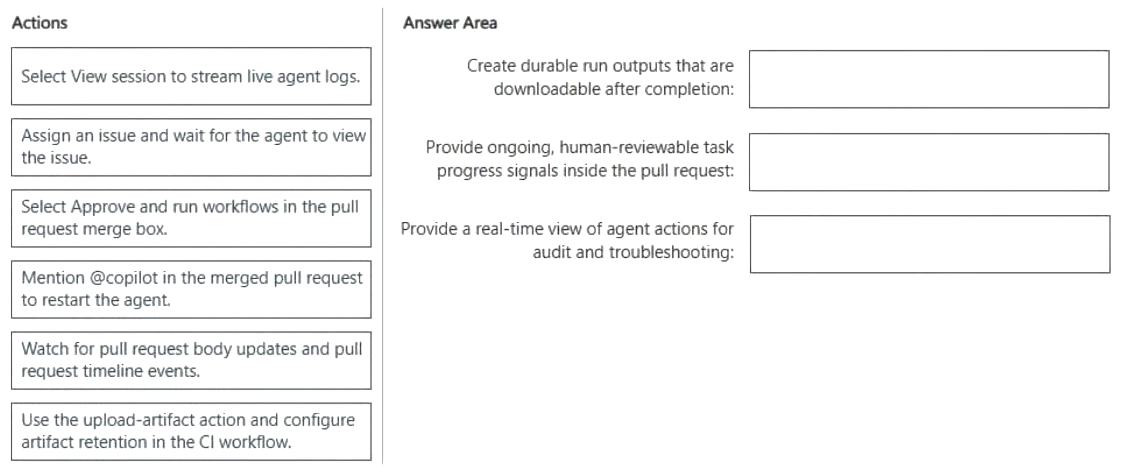
Move each item to the matching row:
- Select View session to stream live agent logs.
- Assign an issue and wait for the agent to view the issue.
- Select Approve and run workflows in the pull request merge box.
- Mention @copilot in the merged pull request to restart the agent.
- Watch for pull request body updates and pull request timeline events.
- Use the upload-artifact action and configure artifact retention in the CI workflow.
- Create durable run outputs that are downloadable after completion:
- Provide ongoing, human-reviewable task progress signals inside the pull request:
- Provide a real-time view of agent actions for audit and troubleshooting:
Show answer
- Create durable run outputs that are downloadable after completion: Use the upload-artifact action and configure artifact retention in the CI workflow.
- Provide ongoing, human-reviewable task progress signals inside the pull request: Watch for pull request body updates and pull request timeline events.
- Provide a real-time view of agent actions for audit and troubleshooting: Select View session to stream live agent logs.
WhyWorkflow artifacts with configured retention stay downloadable after a run ends. The coding agent records progress in the pull request body and timeline, where reviewers can follow it. View session opens the live session logs, showing the agent's actions as they happen.
- You are about to start a complex refactoring task in the GitHub Copilot CLI.
Before Copilot makes any changes, you need to review and agree on the approach.
What should you do first?- AStart the Copilot CLI and specify the --agent=Task parameter.
- BStart the Copilot CLI and specify the --allow-all parameter.
- CFrom the Copilot CLI, switch to plan mode.
- DFrom the Copilot CLI, run the /compact command.
Show answer
Correct answer: C
WhyPlan mode in the Copilot CLI makes Copilot propose a step-by-step plan for you to review and approve before any changes are made. --allow-all removes approval prompts, which is the opposite of what is wanted. /compact only summarizes history, and --agent=Task is not a planning gate.
- A
- A team assigns an issue to the GitHub Copilot coding agent by using the following one-line description: Fix the login bug.
Copilot creates a pull request, but the pull request is missing changes and has an incorrect scope.
How should you resolve the issue?- AEnable Copilot memory.
- BUpdate the Model Context Protocol (MCP) server rate limits.
- CAdd a clear description of the problem to the issue.
- DAllocate more resources to copilot-setup-steps.yml.
Show answer
Correct answer: C
WhyThe coding agent works from the issue text as its prompt, so a one-line description gives too little scope and the pull request misses changes. Adding a clear problem description, expected behavior and acceptance criteria fixes it. Memory, MCP rate limits and setup-step resources do not address vague requirements.
- A
- You have a repository on github.com that uses the GitHub Copilot coding agent.
You also use the GitHub Copilot CLI locally to reproduce failures and continue the same work from your terminal.
You need to verify the current token usage.
Which Copilot CLI slash command should you run?- A/compact
- B/diff
- C/usage
- D/context
Show answer
Correct answer: C
WhyThe /usage command reports session usage metrics such as tokens and requests consumed. /context is a close alternative, since it shows context window token occupancy, which may be what the question intends. /compact summarizes history and /diff shows file changes, so neither reports token usage.
- A
- You have a GitHub Copilot coding agent named CodeAgent. The .agent.md file of CodeAgent contains the following YAML frontmatter.
---
name: CodeAgent
description: Performs repository analysis and code review tasks.
tools: ['edit', 'execute', 'read', 'search']
---
You need to issue a GitHub Copilot CLI command that preserves execution velocity for read-only tasks by eliminating approval prompts for low-risk tools. The solution must ensure that high-risk tools that can make changes remain available but still require explicit user approval before running.
Which command should you run?- Acopilot agent run CodeAgent --deny-tool 'edit,execute'
- Bcopilot agent run CodeAgent --allow-all-tools
- Ccopilot agent run CodeAgent
- Dcopilot agent run CodeAgent --allow-tool 'read,search'
- Ecopilot agent run CodeAgent --allow-tool 'read,search' --deny-tool 'edit,execute'
Show answer
Correct answer: D
WhyUsing --allow-tool 'read,search' pre-approves only the low-risk read and search tools, while edit and execute stay available but still prompt for approval. --allow-all-tools approves everything, --deny-tool blocks tools outright instead of requiring approval, and the plain command prompts for every tool.
- A
- DRAG DROP
You have a GitHub repository that uses GitHub Actions for CI on pull requests.
You have a GitHub Copilot coding agent that opens pull requests for backlog items, and your company requires automated checks for agent-generated changes.
You plan to standardize success criteria so that pull requests created by agents only succeed when unit tests pass and CodeQL analysis completes.
You need to configure a GitHub Actions workflow that runs on pull requests, executes unit tests, and performs CodeQL analysis.
How should you complete the workflow? To answer, drag the appropriate values to the correct targets. Each value may be used once, more than once, or not at all. You may need to drag the split bar between panes or scroll to view content.
NOTE: Each correct selection is worth one point.
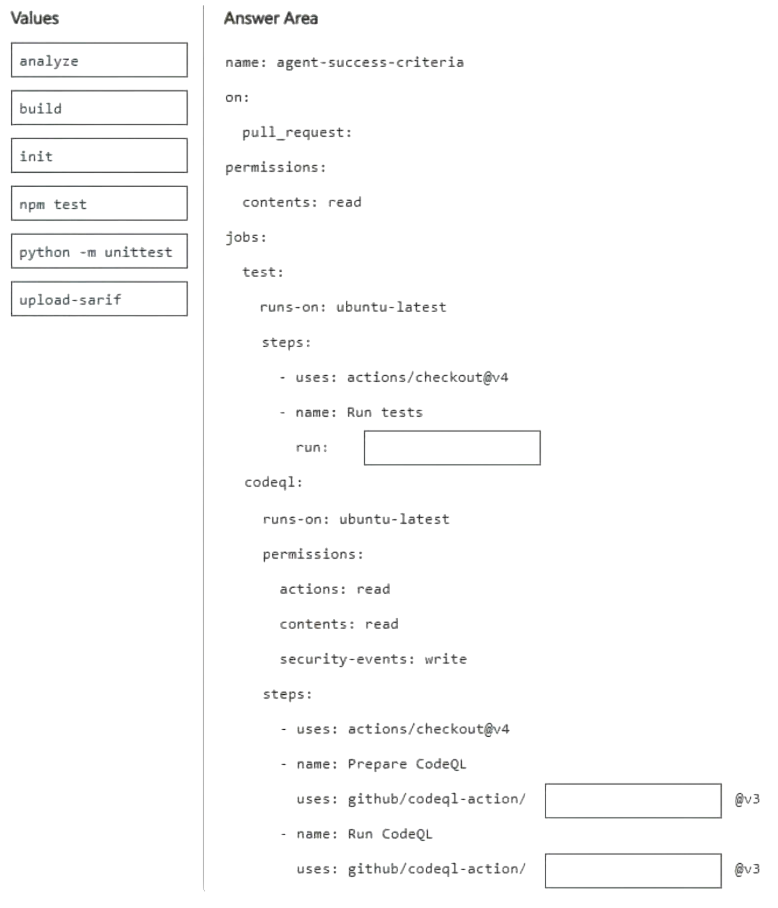
Move each item to the matching row:
- analyze
- build
- init
- npm test
- python -m unittest
- upload-sarif
- Run tests run:
- Prepare CodeQL uses: github/codeql-action/
- Run CodeQL uses: github/codeql-action/
Show answer
- Run tests run: npm test
- Prepare CodeQL uses: github/codeql-action/ init
- Run CodeQL uses: github/codeql-action/ analyze
WhyCodeQL workflows run the init action to prepare the database, then analyze to run queries and report results. The question names no language, so npm test is the likely intended command, though python -m unittest would suit a Python project.
- HOTSPOT
You have a GitHub repository that uses the GitHub Copilot coding agent to resolve issues and create draft pull requests.
You assign an issue to Copilot. Copilot creates a draft pull request. The pull request timeline shows Copilot started work, followed by status updates. The most recent status update is 55 minutes old.
You discover that the agent is no longer making progress.
You need to ensure that the work resumes without redoing the completed steps or changing the previously chosen approach.
What should you do? To answer, select the appropriate options in the answer area.
NOTE: Each correct selection is worth one point.
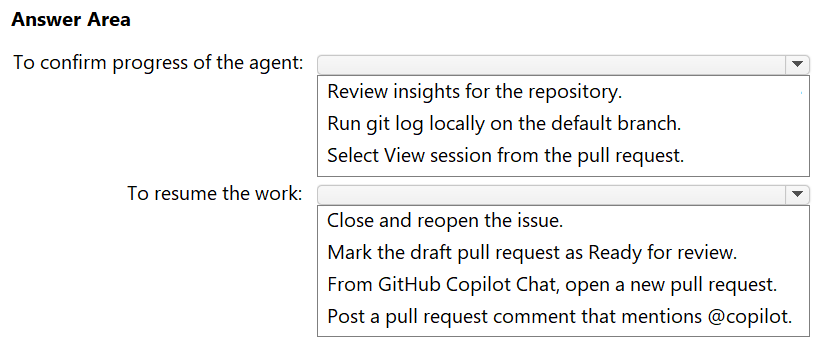
To confirm progress of the agent: Review insights for the repository. / Run git log locally on the default branch. / Select View session from the pull request. To resume the work: Close and reopen the issue. / Mark the draft pull request as Ready for review. / From GitHub Copilot Chat, open a new pull request. / Post a pull request comment that mentions @copilot. Show answer
- To confirm progress of the agent: Select View session from the pull request.
- To resume the work: Post a pull request comment that mentions @copilot.
WhyView session shows the agent's session logs, confirming what it did and where it stopped. Mentioning @copilot in a pull request comment continues work on the same branch and pull request, keeping completed steps and the chosen approach instead of starting over.
- You have a GitHub repository that uses the GitHub Copilot coding agent.
Your company restricts GitHub Actions secrets.
Developers need the Copilot coding agent to call an internal dependency-scanning API during its run. The API requires an access token.
You need to ensure that the Copilot coding agent can use the token during execution without accessing the repository's Actions secrets and variables. The solution must prevent exposing the token in plaintext.
What should you do?- AAdd the token as an Actions repository secret.
- BAdd the token as a secret in the Copilot environment.
- CStore the token in a repository custom instructions file.
- DStore the token in the agent configuration file.
Show answer
Correct answer: B
WhySecrets added to the Copilot environment (with the COPILOT_MCP_ prefix for MCP use) are available to the coding agent but kept separate from Actions secrets and variables, and are not exposed in plaintext. Actions secrets are restricted here, and instruction or agent files are committed in plaintext.
- A
- HOTSPOT
You have the following agent logs.
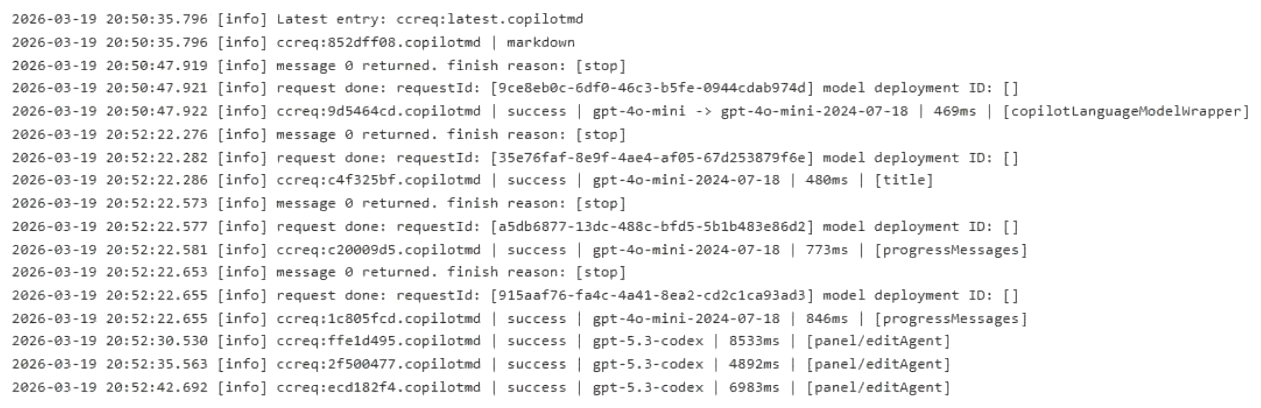
For each of the following statements, select Yes if the statement is true. Otherwise, select No.
NOTE: Each correct selection is worth one point.
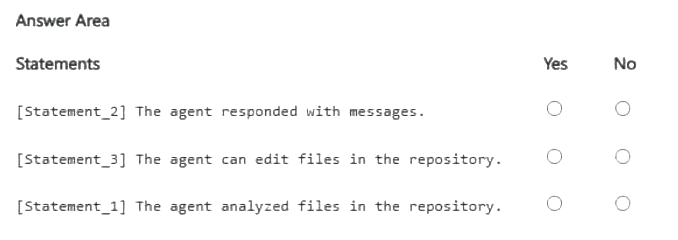
[Statement_2] The agent responded with messages. Yes / No [Statement_3] The agent can edit files in the repository. Yes / No [Statement_1] The agent analyzed files in the repository. Yes / No Show answer
- [Statement_2] The agent responded with messages. Yes
- [Statement_3] The agent can edit files in the repository. Yes
- [Statement_1] The agent analyzed files in the repository. No
WhyEntries such as 'message 0 returned' with finish reason stop show responses, and panel/editAgent shows the edit-capable agent. The excerpt lists only model requests, with no file-reading tool calls, so it gives no evidence of file analysis. That last answer is an inference.
- You use a GitHub Actions workflow to orchestrate a multi-agent draft-review process for pull requests. The workflow uploads a single combined review-package artifact at the end of each run.
You discover that the review-package artifact is occasionally missing from the workflow run history, and you suspect that a user deleted it.
You need to identify which user manually deleted a workflow run artifact and when the deletion occurred.
What should you use?- Athe checks.delete_logs audit log event
- Bthe pull request description and comment history
- Cthe merge commit history
- Dthe artifact.destroy audit log event
Show answer
Correct answer: D
WhyThe artifact.destroy audit log event records the actor and timestamp when a workflow run artifact is manually deleted. checks.delete_logs concerns deleted logs, not artifacts. Pull request comments and merge commit history do not record artifact deletions.
- A
- You have a GitHub Copilot coding agent that has completed a pull request for a security fix in your repository.
Before merging, you need to evaluate the quality of the agent's work by using both automated evaluation signals and human review.
You review the session log and the pull request.
What are two automated evaluation signals generated by the coding agent's built-in scanning tools? Each correct answer presents a complete solution.
NOTE: Each correct selection is worth one point.- Alinting errors from the repository's CI pipeline configured in GitHub Actions
- Bcomments from Copilot code review that suggest improvements to code patterns
- Cthe detection of hardcoded secrets, such as API keys and tokens
- Dthe median time to merge metric reported on the Copilot usage metrics dashboard
- ECodeQL findings that identify security vulnerabilities in the generated code
Show answer
Correct answer: C, E
WhyThe coding agent runs built-in scanning on its changes: secret scanning detects hardcoded keys and tokens, and CodeQL finds vulnerabilities in the generated code. Repository CI lint results, Copilot code review comments and the usage dashboard's merge time metric are separate signals, not built-in agent scanners.
- A
- HOTSPOT
You have a GitHub repository that contains the following custom agent files:
A file named planner.agent.md that includes YAML frontmatter with a handoffs entry that has label: Start Implementation, agent: implementer, and prompt: Now implement the plan outlined above
A file named implementer.agent.md that is in the same directory as planner.agent.md and includes YAML frontmatter that has name: IMPLEMENTER
You add a third agent file named review.agent.md.review.agent.md includes YAML frontmatter that has name: code-review.
You make the following changes to planner.agent.md:
Update the existing handoff to include send: true and model: GPT-5.2 (copilot).
Add a second handoff that has label: Run Review, agent: code-review, and prompt: Review the code changes made in the previous step.
No other agent files are modified.
For each of the following statements, select Yes if the statement is true. Otherwise, select No.
NOTE: Each correct selection is worth one point.
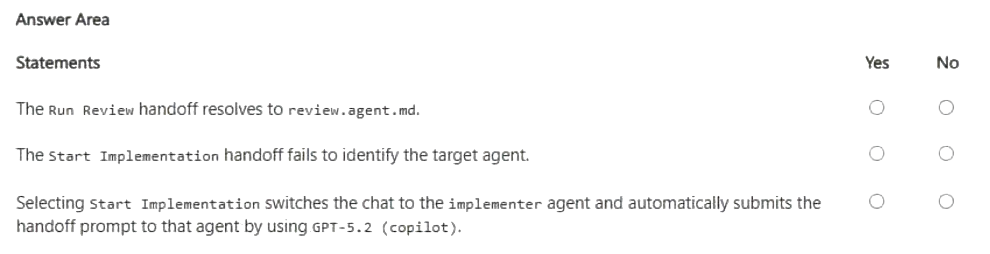
The Run Review handoff resolves to review.agent.md. Yes / No The Start Implementation handoff fails to identify the target agent. Yes / No Selecting Start Implementation switches the chat to the implementer agent and automatically submits the handoff prompt to that agent by using GPT-5.2 (copilot). Yes / No Show answer
- The Run Review handoff resolves to review.agent.md. Yes
- The Start Implementation handoff fails to identify the target agent. No
- Selecting Start Implementation switches the chat to the implementer agent and automatically submits the handoff prompt to that agent by using GPT-5.2 (copilot). Yes
WhyHandoffs target an agent's name, so code-review resolves to review.agent.md, and implementer matches the name IMPLEMENTER because the lookup ignores case. Setting send to true submits the prompt automatically, and the model property selects GPT-5.2 for the handoff.
- You have a GitHub repository that contains an agent named Orchestrator.Orchestrator delegates work to the following specialized subagents:
Planner reviews issues and creates a plan of action.
Implementer writes code based on the plan of action.
Reviewer reviews the code.
You create a new agent named Summarizer that produces a concise summary of the work performed by the other agents.
You need to ensure that Orchestrator can invoke Summarizer as part of its workflow.
What should you do?- AIn the YAML frontmatter of the Reviewer agent, add a handoffs entry that points to the Summarizer agent.
- BIn the YAML frontmatter of the Reviewer agent, add Summarizer to the agents list.
- CIn the YAML frontmatter of the Orchestrator agent, add Summarizer to the tools list.
- DIn the YAML frontmatter of the Orchestrator agent, add Summarizer to the agents list.
Show answer
Correct answer: D
WhyA coordinating agent declares which subagents it may call in the agents list of its own YAML frontmatter, so Summarizer must be added to Orchestrator's agents list. Handoffs are user-driven transitions between agents, adding it to Reviewer is the wrong agent, and tools lists tools, not agents.
- A
- You have a GitHub Copilot coding agent named Orchestrator that runs a multi-phase workflow by using the following subagents:
Explorer gathers context by using read-only tools.
Modifier applies focused edits.
You are adding a new agent named Summarizer that generates a concise summary after modifications are complete. Summarizer includes the following YAML frontmatter.
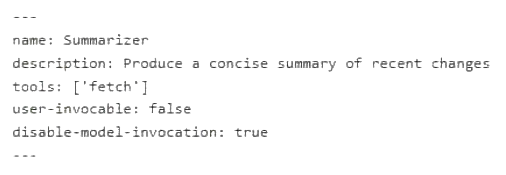
The Orchestrator agent lists all three agents in its agents property.
After adding the Summarizer agent, Orchestrator successfully runs Explorer and Modifier but fails to run Summarizer.
What is a possible cause of the failure?- ASummarizer cannot be invoked as a subagent because disable-model-invocation is set to true.
- BOrchestrator is missing a handoff entry to trigger Summarizer.
- COrchestrator cannot call Summarizer because user-invocable is set to false.
- DSummarizer is missing the editing tools required to complete the workflow.
Show answer
Correct answer: A
WhySummarizer sets disable-model-invocation: true, which prevents other agents such as Orchestrator from invoking it as a subagent. The user-invocable false setting only hides it from the user picker and does not stop subagent calls. Handoffs are not required, and the fetch tool is fine for summarizing.
- A
- You have a GitHub Enterprise Cloud Organization that uses GitHub Actions for CI/CD.
You plan to enable an agent to update and deploy workflows that access production environment secrets.
You need to select an autonomy level for a compliance-sensitive workflow.
Which autonomy level should you select?- Aread-only analysis with no ability to trigger workflows
- Bautonomous execution limited to non-production environments
- Chuman-in-the-loop with required manual approvals for production
- Dfully autonomous execution without approvals
Show answer
Correct answer: C
WhyFor a compliance-sensitive workflow touching production secrets, human-in-the-loop with required manual approvals, such as environment protection rules with required reviewers, lets the agent do the work while a person gates production. Read-only is too limited for updating workflows, and unapproved production autonomy breaks compliance.
- A