

MD-102 sample exam questions
15 exam-style questions for Microsoft MD-102: Endpoint Administrator, with answers and explanations. Take them as a timed practice exam first if you want a score out of 1000.
- DRAG DROP
You have a Microsoft 365 E5 subscription and a computer that runs Windows 11.
You need to create a customized installation of Microsoft 365 Apps for enterprise.
Which four actions should you perform in sequence? To answer, move the appropriate cmdlets from the list of cmdlets to the answer area and arrange them in the correct order.
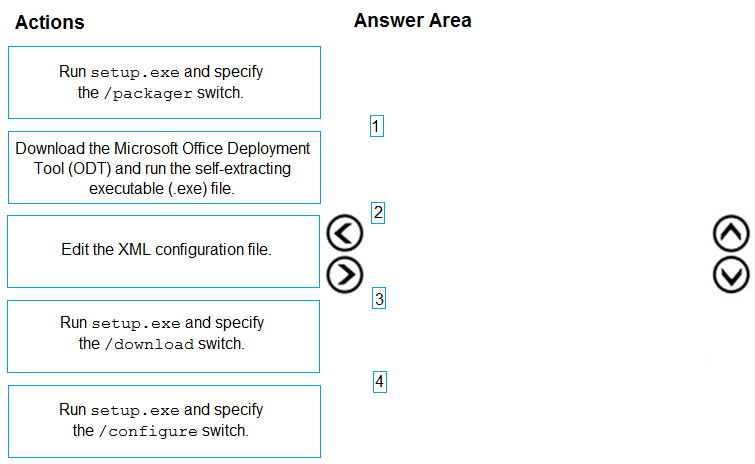
Arrange 4 of these in the correct order:
- Run setup.exe and specify the /packager switch.
- Download the Microsoft Office Deployment Tool (ODT) and run the self-extracting executable (.exe) file.
- Edit the XML configuration file.
- Run setup.exe and specify the /download switch.
- Run setup.exe and specify the /configure switch.
Show answer
- Download the Microsoft Office Deployment Tool (ODT) and run the self-extracting executable (.exe) file.
- Edit the XML configuration file.
- Run setup.exe and specify the /download switch.
- Run setup.exe and specify the /configure switch.
WhyExtract the Office Deployment Tool to get setup.exe and sample XML files, edit configuration.xml with products, languages and exclusions, run setup.exe /download to fetch the source files, and then setup.exe /configure to install. /packager creates App-V packages and is not needed.
- You have a Microsoft 365 E5 subscription and 25 Apple iPads.
You need to enroll the iPads in Microsoft Intune by using the Apple Configurator enrollment method.
What should you do first?- AConfigure an Apply MDM push certificate.
- BAdd your user account as a device enrollment manager (DEM).
- CModify the enrollment restrictions.
- DUpload a file that has the device identifiers for each iPad.
Show answer
Correct answer: A
WhyEvery iOS/iPadOS enrollment method, Apple Configurator included, first requires an Apple MDM push certificate (APNs) in Intune. Uploading device serial numbers and creating the Apple Configurator profile come afterward, and DEM accounts or enrollment restrictions are not prerequisites.
- A
- You have a Microsoft 365 E5 subscription that contains 150 hybrid Azure AD joined Windows devices. All the devices are enrolled in Microsoft Intune.
You need to configure Delivery Optimization on the devices to meet the following requirements:
Allow downloads from the internet and from other computers on the local network.
Limit the percentage of used bandwidth to 50.
What should you use?- Aa configuration profile
- Ba Windows Update for Business Group Policy setting
- Ca Microsoft Peer-to-Peer Networking Services Group Policy setting
- Dan Update ring for Windows 10 and later profile
Show answer
Correct answer: A
WhyDelivery Optimization download mode (HTTP plus LAN peering) and the maximum bandwidth percentage are set in an Intune device configuration profile using the Delivery Optimization template or Settings catalog. Update rings control update deferrals and deadlines, and the Group Policy options listed are not the Delivery Optimization settings.
- A
- You use Windows Admin Center to remotely administer computers that run Windows 10.
When connecting to Windows Admin Center, you receive the message shown in the following exhibit.
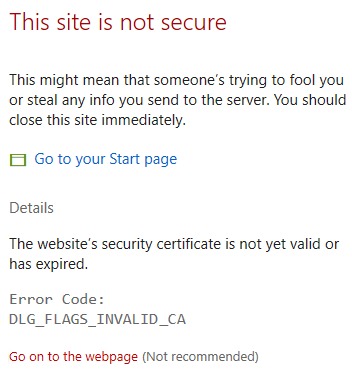
You need to prevent the message from appearing when you connect to Windows Admin Center.
To which certificate store should you import the certificate?- AClient Authentication Issuers
- BPersonal
- CTrusted Root Certification Authorities
Show answer
Correct answer: C
WhyThe error DLG_FLAGS_INVALID_CA means the browser does not trust the certificate issuer, as with the self-signed Windows Admin Center certificate. Importing that certificate into the Trusted Root Certification Authorities store makes it trusted. The Personal and Client Authentication Issuers stores do not establish trust for the server.
- A
- HOTSPOT
You have a Microsoft 365 subscription that uses Microsoft Intune and contains the users shown in the following table.

Group2 has been assigned in the Enrollment Status Page.
You have the devices shown in the following table.
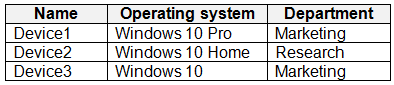
You capture and upload the hardware IDs of the devices in the marketing department.
You configure Windows Autopilot.
For each of the following statements, select Yes if the statement is true. Otherwise, select No.
NOTE: Each correct selection is worth one point.
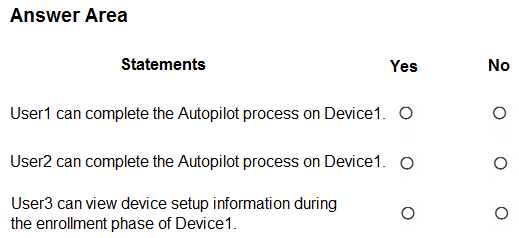
User1 can complete the Autopilot process on Device1. Yes / No User2 can complete the Autopilot process on Device1. Yes / No User3 can view device setup information during the enrollment phase of Device1. Yes / No Show answer
- User1 can complete the Autopilot process on Device1. No
- User2 can complete the Autopilot process on Device1. Yes
- User3 can view device setup information during the enrollment phase of Device1. Yes
WhyAutopilot user-driven mode needs a user with an Intune license so the device can auto-enroll. User1 has no license, while User2's Microsoft 365 E3 includes Intune. The Enrollment Status Page is assigned to Group2, so User3 sees setup progress during enrollment.
- You have a Microsoft 365 subscription that contains 100 devices enrolled in Microsoft Intune.
You need to review the startup processes and how often each device restarts.
What should you use?- AEndpoint analytics
- BDevice Management
- CAzure Monitor
- DIntune Data Warehouse
Show answer
Correct answer: A
WhyEndpoint analytics in Intune reports startup performance, including startup processes that delay boot and sign-in, and restart frequency per device. Azure Monitor, Intune Data Warehouse and generic device management views do not provide these ready-made metrics.
- A
- DRAG DROP
Your network contains an Active Directory domain.
You install the Microsoft Deployment Toolkit (MDT) on a server.
You have a custom image of Windows 11.
You need to deploy the image to 100 devices by using MDT.
Which three actions should you perform in sequence? To answer, move the appropriate actions from the list of actions to the answer area and arrange them in the correct order.
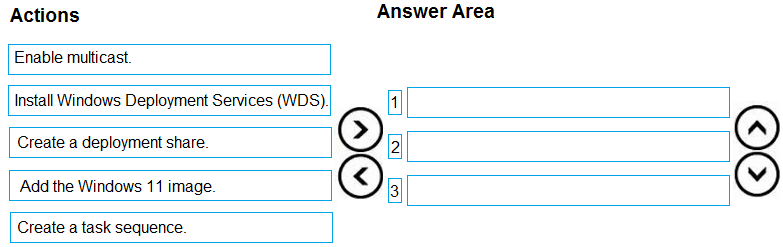
Arrange 3 of these in the correct order:
- Enable multicast.
- Install Windows Deployment Services (WDS).
- Create a deployment share.
- Add the Windows 11 image.
- Create a task sequence.
Show answer
- Create a deployment share.
- Add the Windows 11 image.
- Create a task sequence.
WhyIn MDT you first create a deployment share, then import the custom Windows 11 image into it, then create a task sequence that deploys that image. WDS and multicast are optional. MDT is retired and no longer supported for new deployments.
- HOTSPOT
You have a Microsoft 365 subscription that contains a user named User1. The subscription contains devices enrolled in Microsoft Intune as shown in the following table.

Microsoft Edge is available on all the devices.
Intune has the device compliance policies shown in the following table.

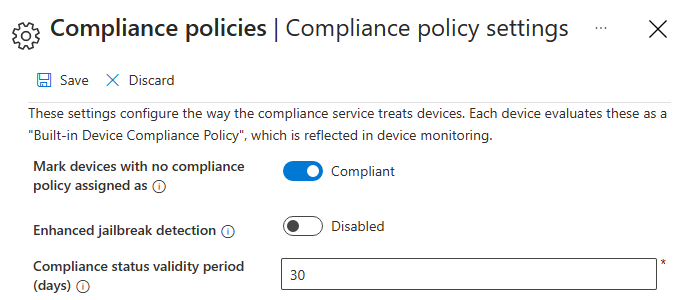
The Compliance policy settings are configured as shown in the exhibit. (Click the Exhibit tab.)
You create the following Conditional Access policy:
• Name: Policy1
• Assignments
o Users and groups: User1
o Cloud apps or actions: Office 365 SharePoint Online
• Access controls
o Grant: Require device to be marked as compliant
• Enable policy: On
For each of the following statements, select Yes if the statement is true. Otherwise, select No.
NOTE: Each correct selection is worth one point.
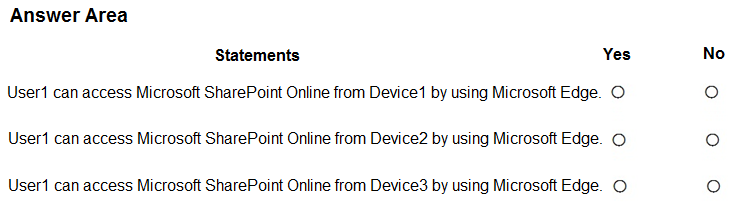
User1 can access Microsoft SharePoint Online from Device1 by using Microsoft Edge. Yes / No User1 can access Microsoft SharePoint Online from Device2 by using Microsoft Edge. Yes / No User1 can access Microsoft SharePoint Online from Device3 by using Microsoft Edge. Yes / No Show answer
- User1 can access Microsoft SharePoint Online from Device1 by using Microsoft Edge. Yes
- User1 can access Microsoft SharePoint Online from Device2 by using Microsoft Edge. Yes
- User1 can access Microsoft SharePoint Online from Device3 by using Microsoft Edge. No
WhyDevice1 has no compliance policy and the default marks it compliant. Device2 meets the encryption requirement. Device3 does not encrypt storage, so Compliance2 marks it noncompliant and Conditional Access blocks it.
- DRAG DROP
You have a Microsoft 365 subscription that uses Microsoft Defender for Endpoint.
You plan to onboard the following types of devices to Defender for Endpoint:
• macOS
• Linux Server
What should you use to onboard each device? To answer, drag the appropriate tools to the correct device types. Each tool may be used once, more than once, or not at all. You may need to drag the split bar between panes or scroll to view content.
NOTE: Each correct selection is worth one point.
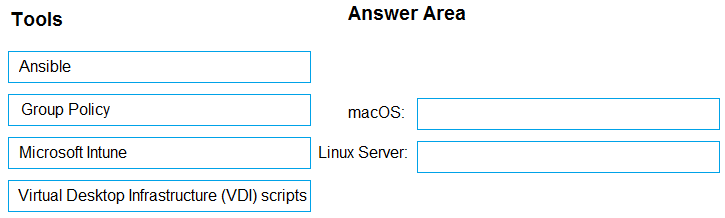
Move each item to the matching row:
- Ansible
- Group Policy
- Microsoft Intune
- Virtual Desktop Infrastructure (VDI) scripts
- macOS:
- Linux Server:
Show answer
- macOS: Microsoft Intune
- Linux Server: Ansible
WhymacOS devices can be onboarded through Microsoft Intune or another MDM, or by a local script. Linux servers use a script, Puppet, Ansible or Chef. Group Policy and VDI scripts apply only to Windows devices.
- You need to assign the same deployment profile to all the computers that are configured by using Windows Autopilot.
Which two actions should you perform? Each correct answer presents part of the solution.
NOTE: Each correct selection is worth one point.- ACreate an Azure AD group that has dynamic membership rules and uses the ZTDID tag.
- BCreate an Azure AD group that has dynamic membership rules and uses the operatingSystem tag.
- CAssign a Windows Autopilot deployment profile to a group.
- DJoin the computers to Azure AD.
- ECreate a Group Policy object (GPO) that is linked to a domain.
- FJoin the computers to an on-premises Active Directory domain.
Show answer
Correct answer: A, C
WhyCreate a dynamic device group with the rule (device.devicePhysicalIDs -any _ -contains "[ZTDId]"), which captures all Autopilot-registered devices, and assign the Windows Autopilot deployment profile to that group. The operatingSystem attribute would also include non-Autopilot devices, and AD join or GPOs are not needed.
- A
- You have a Microsoft 365 E5 subscription.
All devices are enrolled in Microsoft Intune.
You need to ensure that devices that have NOT checked in for 30 days are deleted from Intune.
What should you configure from the Microsoft Intune admin center?- Aa device limit restriction
- Bautomatic enrollment
- Ca device clean-up rule
- Da configuration profile
Show answer
Correct answer: C
WhyDevice clean-up rules in Intune (Devices > Device clean-up rules) automatically remove devices that have not checked in for a set number of days, from 30 to 270. Device limit restrictions, automatic enrollment and configuration profiles do not delete stale devices.
- A
- You have a Microsoft 365 subscription.
You have 10 computers that run Windows 10 and are enrolled in Microsoft Intune.
You need to deploy the Microsoft 365 Apps for enterprise suite to all the computers.
What should you do?- AFrom the Microsoft Intune admin center, add an app.
- BFrom the Microsoft Intune admin center, create a Windows 10 and later device profile.
- CFrom the Microsoft Entra admin center, add an enterprise application.
- DFrom the Microsoft Entra admin center, add an app registration.
Show answer
Correct answer: A
WhyDeploy Microsoft 365 Apps for enterprise from the Intune admin center under Apps > Windows > Add, choosing the Microsoft 365 Apps for Windows 10 and later app type. Device profiles do not install apps, and enterprise applications or app registrations in Entra ID handle authentication.
- A
- You have a Microsoft 365 subscription and use Microsoft Intune Suite.
You plan to use Microsoft Cloud PKI to support the signing and encryption of email messages.
What should you do first?- ACreate a root certification authority (CA).
- BCreate a device compliance policy.
- CCreate device configuration SCEP certificate profiles.
- DCreate device configuration trusted certificate profiles.
- ECreate an issuing certification authority (CA).
Show answer
Correct answer: A
WhyMicrosoft Cloud PKI uses a two-tier hierarchy, so you first create the root CA in Intune, then an issuing CA anchored to it, then the trusted certificate profiles and SCEP profiles (for S/MIME purposes). Compliance policies are not part of the setup.
- A
- You have a Microsoft 365 E5 subscription that contains Windows 11 devices.
All the devices are onboarded to Microsoft Defender for Endpoint.
You need to compare the configuration of the devices against industry standard benchmarks.
What should you use?- AAttack surface map
- BEvents
- CSecurity baselines assessment
- DInitiatives
Show answer
Correct answer: C
WhyMicrosoft Defender Vulnerability Management security baselines assessment compares device configurations against industry benchmarks such as CIS and STIG and shows compliance per device. Attack surface map, Events and Initiatives do not perform benchmark comparisons.
- A
- You have a Microsoft 365 E5 subscription and use the Microsoft Intune Suite. The subscription contains a Microsoft SharePoint Online site named Site1 and 500 Windows devices enrolled in Intune.
You have the apps shown in the following table.

You need to deploy the apps to the devices by using Intune.
For which apps must you upload app package files before you can deploy them?- AApp1 only
- BApp1 and App2 only
- CApp1 and App4 only
- DApp1, App2, and App4 only
- EApp1, App2, App3, and App4
Show answer
Correct answer: A
WhyOnly App1, a Win32 app stored on Site1, must be packaged as .intunewin and uploaded. Web apps are just URLs, Microsoft Store apps are pulled from the Store by Intune, and Enterprise App Catalog Win32 apps are prepackaged by Microsoft.
- A