

MS-700 sample exam questions
15 exam-style questions for Microsoft MS-700: Managing Microsoft Teams, with answers and explanations. Take them as a timed practice exam first if you want a score out of 1000.
- You work as a Systems Administrator for your company. The company has recently purchased a subscription to Microsoft 365.
All users in the company have a Microsoft 365 E3 license.
You plan to deploy Microsoft Teams to all company users.
You need to ensure that only company managers can create teams in Microsoft Teams.
Which of the following should you do first?- AAdd all the managers to a Microsoft Team.
- BAdd all the managers to a universal distribution group.
- CAdd all the managers to an Office 365 group.
- DAdd all the managers to a universal security group.
Show answer
Correct answer: C
WhyTo restrict team (Microsoft 365 group) creation, you first create a group of the allowed users and then set GroupCreationAllowedGroupId with the Entra ID group settings. Microsoft Learn accepts a Microsoft 365 group or a security group, but not a distribution group or a team. Many references expect a security group, so option D is also a valid answer.
- A
- HOTSPOT
Your company has offices in New York and Seattle.
You have a Microsoft 365 subscription that uses Teams.
You plan to assess network connectivity and make recommendations to optimize connectivity from each office to Teams.
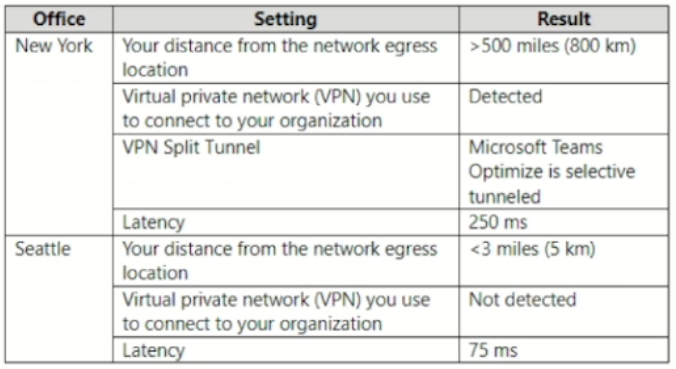
You run the Microsoft 365 network connectivity test tool at both offices and produce the results shown in the following table.
For each of the following statements, select Yes if True. Otherwise select No.
NOTE: Each correct selection is worth one point.
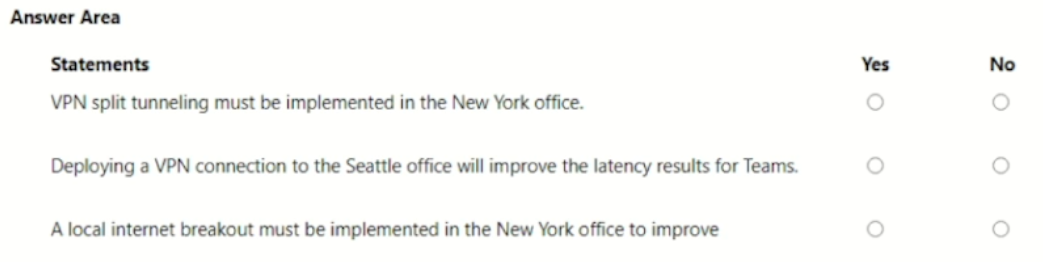
VPN split tunneling must be implemented in the New York office. Yes / No Deploying a VPN connection to the Seattle office will improve the latency results for Teams. Yes / No A local internet breakout must be implemented in the New York office to improve Yes / No Show answer
- VPN split tunneling must be implemented in the New York office. No
- Deploying a VPN connection to the Seattle office will improve the latency results for Teams. No
- A local internet breakout must be implemented in the New York office to improve Yes
WhyNew York already split-tunnels the Teams Optimize traffic, so split tunneling is in place. Adding a VPN in Seattle would only add latency. New York egresses more than 500 miles away, so a local internet breakout is needed to cut its 250 ms latency.
- You have a Microsoft 365 E5 subscription.
From the chat window of a Teams chat, you share a file with a user named User.
User1 reports that when they attempt to open the file in Teams, they receive the following message:
“You don’t have access to this file.”
You need to ensure that User1 can open the file.
What should you do?- AFrom Teams settings in the Microsoft Teams admin center, configure the file storage and sharing options.
- BFrom the SharePoint admin center, configure the Sharing settings.
- CFrom Microsoft OneDrive, set Limited-access user permission lockdown mode to Deactivate.
- DFrom the SharePoint admin center, configure the Access control settings.
Show answer
Correct answer: C
WhyFiles shared in a Teams chat are stored in the sharer's OneDrive. If the Limited-access user permission lockdown mode site collection feature is active on that OneDrive, chat recipients get You don't have access to this file. Deactivating that feature fixes it. Teams file settings and tenant sharing or access control settings are not the cause.
- A
- You have a Microsoft 365 E5 subscription that uses Microsoft Teams.
You need to identify which percentage of meetings include video.
What should you use?- Athe Teams device usage report
- BProductivity Score Meetings insights
- Cthe Teams usage report
- Dthe Teams user activity report
Show answer
Correct answer: B
WhyProductivity Score (now Adoption Score) Meetings insights show how people meet, including the percentage of meetings that use video and screen sharing. Teams usage, user activity and device usage reports show counts per user or team, not the share of meetings with video.
- A
- DRAG DROP
You have a Microsoft 365 E5 subscription that uses Teams.
The sales department at your company requires that a toll-free number appear at the top of a list of numbers on Microsoft Outlook invites to Teams meetings.
Which four actions should you perform in sequence? To answer, move the appropriate actions from the list of actions to the answer area and arrange them in the correct order.
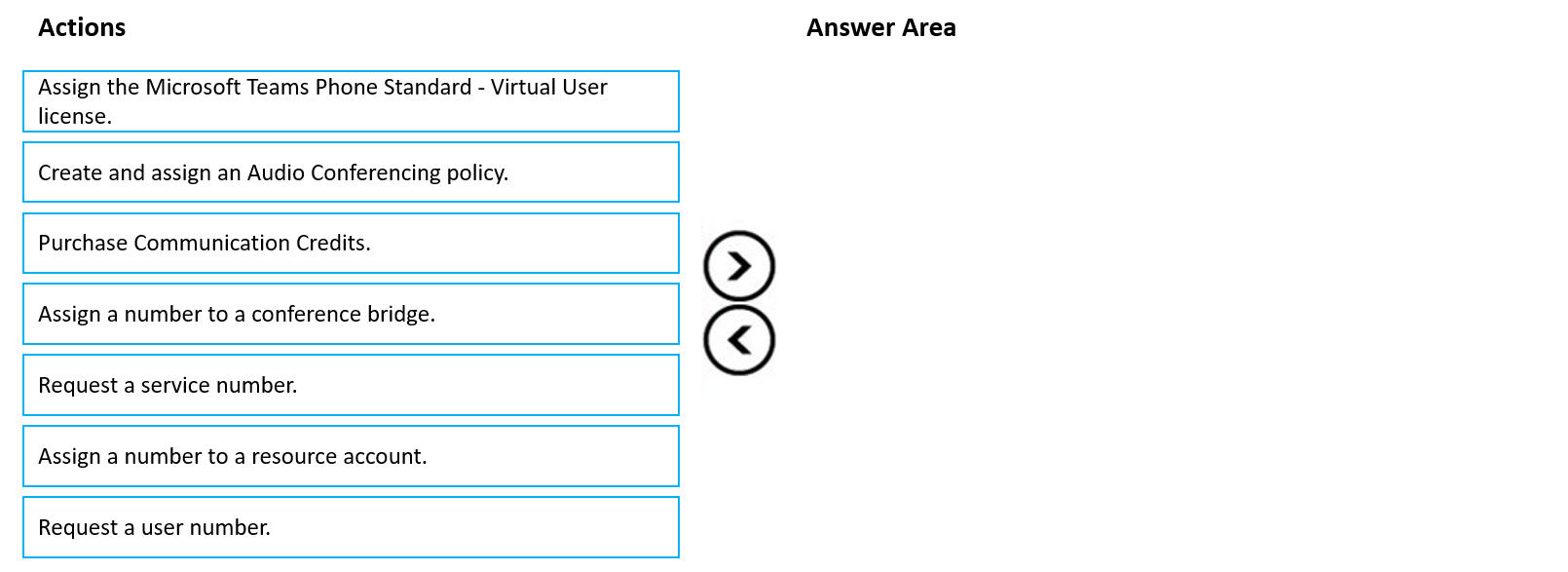
Arrange 4 of these in the correct order:
- Assign the Microsoft Teams Phone Standard - Virtual User license.
- Create and assign an Audio Conferencing policy.
- Purchase Communication Credits.
- Assign a number to a conference bridge.
- Request a service number.
- Assign a number to a resource account.
- Request a user number.
Show answer
- Purchase Communication Credits.
- Request a service number.
- Assign a number to a conference bridge.
- Create and assign an Audio Conferencing policy.
WhyYou need Communication Credits before you can use toll-free dial-in numbers. Get a toll-free service number, assign it to the conference bridge, and then assign an Audio Conferencing policy that puts the toll-free number first in Outlook meeting invites.
- HOTSPOT
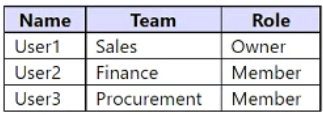
You have a Microsoft 365 subscription that uses Teams. The subscription contains the users shown in the following table.
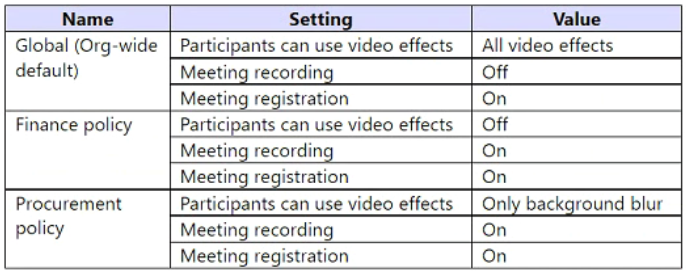
You have the meeting policies shown in the following table.
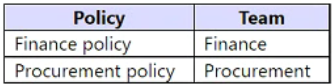
The meeting polices are assigned to teams as shown in the following table.
For each of the following statements, select Yes if True. Otherwise select No.
NOTE: Each correct selection is worth one point.
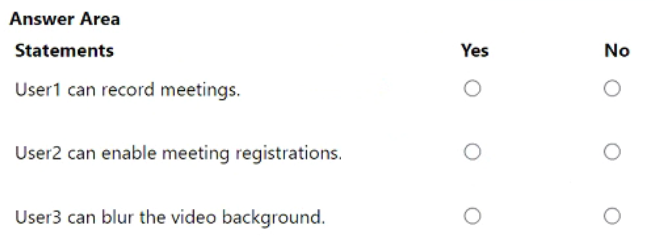
User1 can record meetings. Yes / No User2 can enable meeting registrations. Yes / No User3 can blur the video background. Yes / No Show answer
- User1 can record meetings. No
- User2 can enable meeting registrations. Yes
- User3 can blur the video background. Yes
WhyUser1's Sales team has no assigned policy, so the Global policy applies and recording is off. User2 gets the Finance policy with registration on. User3 gets the Procurement policy, which allows only background blur, so blurring works.
- You have a Teams deployment.
All users are assigned Microsoft 365 Copilot licenses.
You need to ensure that Teams meeting participants can access Copilot features during and after a meeting.
Which setting should you enable first?- ARequire participant agreement for recording and transcription
- BLive captions
- CLive streaming
- DTranscription
Show answer
Correct answer: D
WhyCopilot in Teams meetings that should be available during and after the meeting relies on the meeting transcript, so Transcription must be enabled in the meeting policy first. Live captions and live streaming do not feed Copilot, and requiring participant agreement is an extra consent setting.
- A
- Your company uses Teams.
A user named User1 cannot invite guest users to Teams.
What should you recommend using to identify the cause of the issue?- AMicrosoft Teams network Assessment Tool
- BTeams advisor
- CMicrosoft 365 network connectivity test tool
- Dself-help diagnostics
Show answer
Correct answer: D
WhyMicrosoft 365 admin center self-help diagnostics include a Teams guest access diagnostic that checks the tenant and user settings needed to invite guests and reports the cause. The Network Assessment Tool and the network connectivity test check network quality, and Teams advisor (retired) planned rollouts.
- A
- HOTSPOT
You have a Teams deployment.
You are deploying the new Teams client to user devices.
When some users attempt to install the Teams client they receive an error message that states the client cannot be installed due to organizational policy.
You verify that the latest Windows updates are installed, and no Group Policy Objects (GPOs) are applied to the user devices.
You need to resolve the issue.
How should you complete the PowerShell command? To answer, select the appropriate options in the answer area.
NOTE: Each correct selection is worth one point.
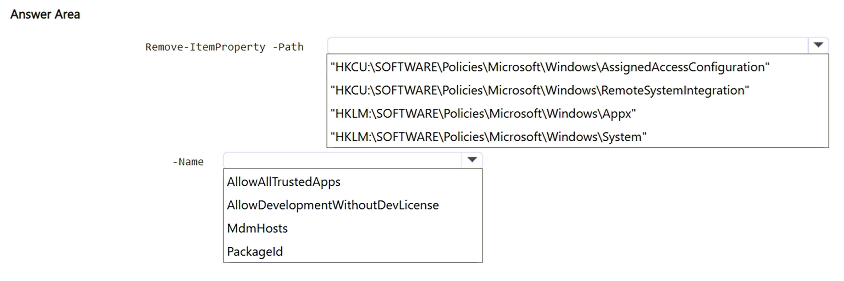
Remove-ItemProperty -Path "HKCU:\SOFTWARE\Policies\Microsoft\Windows\AssignedAccessConfiguration" / "HKCU:\SOFTWARE\Policies\Microsoft\Windows\RemoteSystemIntegration" / "HKLM:\SOFTWARE\Policies\Microsoft\Windows\Appx" / "HKLM:\SOFTWARE\Policies\Microsoft\Windows\System" -Name AllowAllTrustedApps / AllowDevelopmentWithoutDevLicense / MdmHosts / PackageId Show answer
- Remove-ItemProperty -Path "HKLM:\SOFTWARE\Policies\Microsoft\Windows\Appx"
- -Name AllowAllTrustedApps
WhyThe new Teams client is an MSIX package, so app sideloading policy can block it. With no GPOs applied, a leftover AllowAllTrustedApps value under the Appx policy key is the likely cause. Removing it restores the default behavior and lets the trusted package install.
- HOTSPOT
You need to recommend which inbound ports to the network and outbound ports to Office 365 must be allowed on the company's firewall after the planned
upgrade. The solution must meet the security requirements.
Which inbound and outbound ports should you recommend? To answer, select the appropriate options in the answer area.
NOTE: Each correct selection is worth one point.
Hot Area:
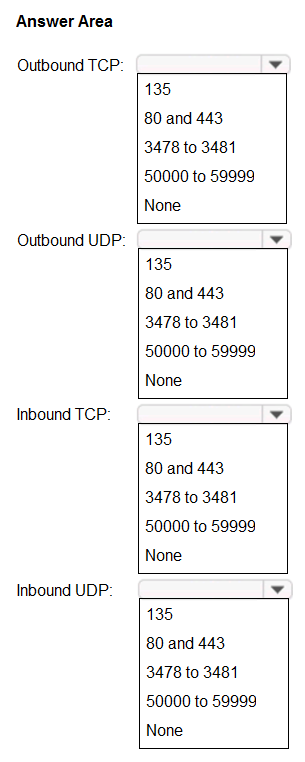
Outbound TCP: 135 / 80 and 443 / 3478 to 3481 / 50000 to 59999 / None Outbound UDP: 135 / 80 and 443 / 3478 to 3481 / 50000 to 59999 / None Inbound TCP: 135 / 80 and 443 / 3478 to 3481 / 50000 to 59999 / None Inbound UDP: 135 / 80 and 443 / 3478 to 3481 / 50000 to 59999 / None Show answer
- Outbound TCP: 80 and 443
- Outbound UDP: 3478 to 3481
- Inbound TCP: None
- Inbound UDP: None
WhyTeams clients start all connections outbound: TCP 80 and 443 for signaling and fallback, and UDP 3478 to 3481 for media. No inbound ports are needed, which keeps the firewall minimal. The case study's security requirements were not available, so this follows Microsoft's published requirements.
- What should you recommend to meet the Microsoft Teams requirements for guest access?
- AFrom the Azure Active Directory admin center, modify the External collaboration settings to include fabrikam.com only.
- BFrom the Microsoft 365 admin center, modify the Office 365 groups settings.
- CFrom the External access settings in the Microsoft Teams admin center, add fabrikam.com to the Allowed list of domains.
- DFrom the Microsoft Teams admin center, turn off org-wide guest access and manually add guest users from fabrikam.com to teams.
Show answer
Correct answer: A
WhyLimiting guest invitations to fabrikam.com is done in the Microsoft Entra ID (formerly Azure AD) external collaboration settings with an allow list of domains. External access in Teams controls federation, not guests, Microsoft 365 group settings only turn guests on or off, and turning off guest access breaks the requirement.
- A
- You need to configure the user accounts of the sales department users to meet the security requirements.
What should you do for each user?- AFrom the Microsoft Teams admin center, set the Microsoft Teams upgrade policy to Skype for Business with Teams collaboration and meetings coexistence mode.
- BFrom PowerShell, run the Grant-CsTeamsUpgradePolicy -PolicyName SfBWithTeamsCollab cmdlet.
- CFrom the Microsoft Teams admin center, set the Microsoft Teams upgrade policy to Skype for Business only coexistence mode.
- DFrom the Microsoft Teams admin center, set the Microsoft Teams upgrade policy to Skype for Business with Teams collaboration coexistence mode.
Show answer
Correct answer: A
WhySetting the users' Teams upgrade policy to Skype for Business with Teams collaboration and meetings mode in the Teams admin center keeps chats and calls in SfB and moves meetings and collaboration to Teams. Option B and D (collaboration only) keep meetings in SfB, and SfB only blocks Teams. Skype for Business Online is now retired.
- A
- You need to create a team for the sales department.
What should you do first?- ACreate a team and modify the membership rule for the teamג€™s Office 365 group.
- BFrom PowerShell, run the Add-AzureAdGroupMember cmdlet.
- CFrom PowerShell, run the New-Team cmdlet.
- DCreate a team and select Build a team from scratch.
Show answer
Correct answer: A
WhyFor a sales team whose membership follows the department, create the team and then change its Microsoft 365 group to dynamic membership with a rule such as user.department -eq "Sales" (Entra ID P1). Add-AzureADGroupMember adds static members, and New-Team or building from scratch gives assigned membership only.
- A
- You need to configure the environment to meet the technical requirements for guest users.
What should you modify from the Microsoft Teams admin center?- Athe global app permission policy
- BGuest access in Users
- Cthe global meeting policy
- Dthe global messaging policy
Show answer
Correct answer: B
WhyGuest user capabilities in Teams, such as calling, IP video, screen sharing, Meet now and messaging, are set in Users > Guest access in the Teams admin center and apply to all guests. Global app permission, meeting and messaging policies apply to internal users and would affect everyone.
- A
- You need to configure Microsoft Teams to meet the collaboration and meeting requirements.
Which two actions should you perform from the Microsoft Teams admin center? Each correct answer presents part of the solution.
NOTE: Each correct selection is worth one point.- AModify the Meeting settings.
- BCreate a team's policy.
- CCreate a meeting policy.
- DCreate a live events policy.
- EModify the Teams settings.
Show answer
Correct answer: B, C
WhyNo community answer was given, and the case study text is not available. Collaboration requirements such as channel creation are set with a custom Teams policy, and meeting requirements such as recording or lobby settings with a custom meeting policy, each assigned to the right users. Meeting settings and Teams settings apply org-wide, and live events policies only cover live events.
- A