

MS-721 sample exam questions
15 exam-style questions for Microsoft MS-721: Collaboration Communications Systems Engineer, with answers and explanations. Take them as a timed practice exam first if you want a score out of 1000.
- HOTSPOT
Your company has a Teams Phone deployment.
The network team at the company completes a local internet breakout for Teams traffic.
To validate the configuration, you review the Call Debug log shown in the following exhibit.
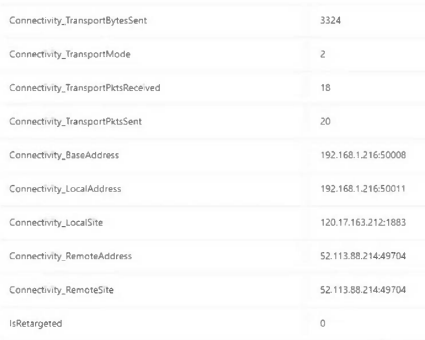
Use the drop down menus to select the answer choice that completes each statement based on the information presented in the graphic.
NOTE: Each correct selection is worth one point.
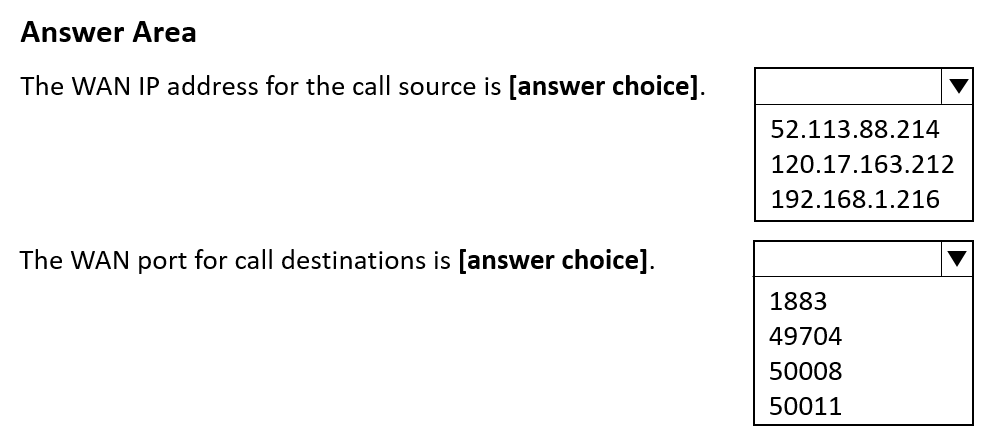
The WAN IP address for the call source is [answer choice]. 52.113.88.214 / 120.17.163.212 / 192.168.1.216 The WAN port for call destinations is [answer choice]. 1883 / 49704 / 50008 / 50011 Show answer
- The WAN IP address for the call source is [answer choice]. 120.17.163.212
- The WAN port for call destinations is [answer choice]. 49704
WhyLocalSite shows the public (NAT-translated) address of the caller, 120.17.163.212, while LocalAddress and BaseAddress are private 192.168.x addresses. RemoteSite and RemoteAddress show the Microsoft media relay endpoint, so the destination port is 49704.
- DRAG DROP
Your company plans to use Microsoft Teams for collaboration and communication.
You need to deploy Microsoft Surface Hub devices to Teams meeting rooms.
Which four actions should you perform in sequence? To answer, move the appropriate actions from the list of actions to the answer area and arrange them in the correct order.
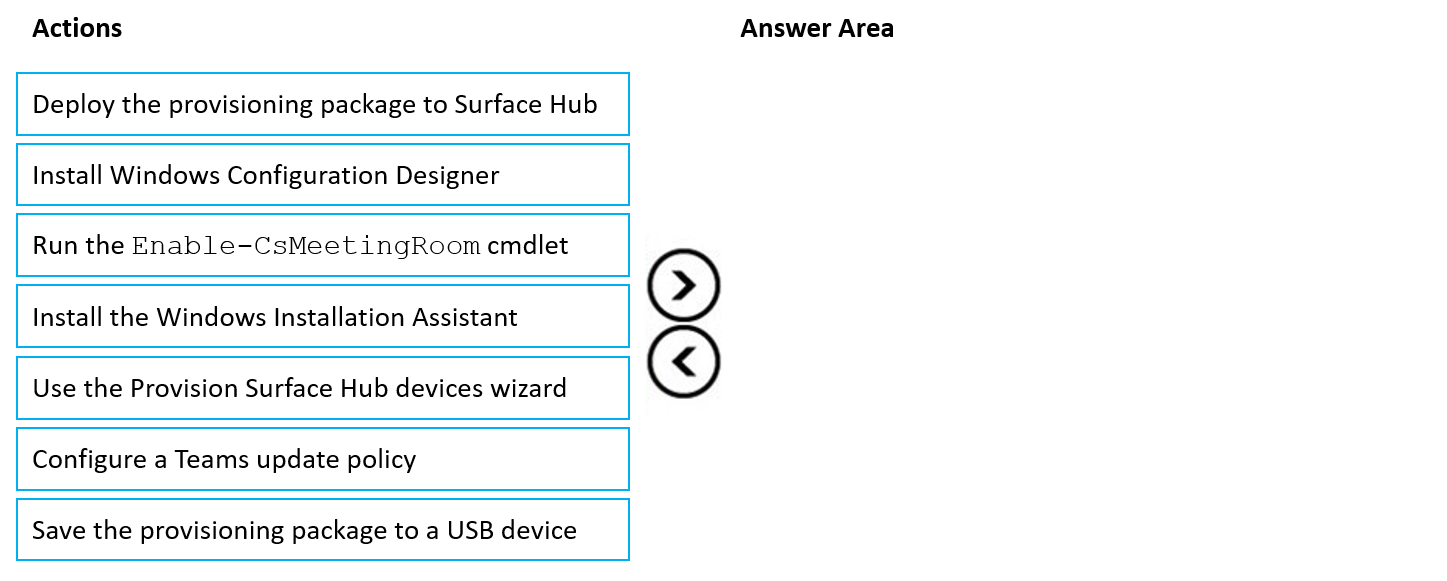
Arrange 4 of these in the correct order:
- Deploy the provisioning package to Surface Hub
- Install Windows Configuration Designer
- Run the Enable-CsMeetingRoom cmdlet
- Install the Windows Installation Assistant
- Use the Provision Surface Hub devices wizard
- Configure a Teams update policy
- Save the provisioning package to a USB device
Show answer
- Install Windows Configuration Designer
- Use the Provision Surface Hub devices wizard
- Save the provisioning package to a USB device
- Deploy the provisioning package to Surface Hub
WhySurface Hub provisioning packages are built in Windows Configuration Designer using its Provision Surface Hub devices wizard. The package is exported to a USB drive and applied to the Surface Hub during first-run setup or from Settings.
- HOTSPOT
You have a Microsoft 365 E5 subscription that uses Teams.
You discover that the Conference Bridge list contains two dial-in phone numbers for an office in Calgary. One of the dial-in phone numbers is +14035554321 and is configured as a secondary number for the Calgary office. The number is NOT set as the default.
You need to remove +14035554321 from the list.
How should you complete the command? To answer, select the appropriate options in the answer area.
NOTE: Each correct selection is worth one point.

Cmdlet Remove-CsOnlineDialInConferencingTenantSettings / Set-CsOnlineDialInConferencingServiceNumber / Set-CsOnlineDialInConferencingTenantSettings / Unregister-CsOnlineDialInConferencingServiceNumber Parameter -Identity / -FromNumber / -RemoveDefaultServiceNumber / -IncludeTollFreeNumberInMeetingInvites Show answer
- Cmdlet Unregister-CsOnlineDialInConferencingServiceNumber
- Parameter -Identity
WhyUnregister-CsOnlineDialInConferencingServiceNumber removes a service number from an audio conferencing bridge, and -Identity names that number. -RemoveDefaultServiceNumber applies only to the bridge's default number, which this secondary number is not. The Set cmdlets change settings rather than removing numbers from the bridge.
- You have a Microsoft 365 E5 subscription that uses Microsoft Teams.
You have a legacy PBX solution for audio conferencing that contains a dial-in toll number.
You need to migrate the dial-in toll number to Teams meetings.
What should you do first?- AFrom the Microsoft 365 admin center, assign Teams Audio Conferencing add-on licenses to the users.
- BFrom the Microsoft 365 admin center, assign Teams Phone Standard add-on licenses to the users.
- CFrom the Microsoft Teams admin center, select Phone numbers, select Numbers, and then select Port
- DFrom the Microsoft Teams admin center, select Phone numbers, select Numbers, and then select Add
Show answer
Correct answer: C
WhyTo keep an existing legacy dial-in toll number, you first port it into Teams from the Phone numbers page using Port, as service numbers are ported to the tenant. Adding new numbers would give a different number, and licenses can be assigned later.
- A
- You have a Microsoft Teams Phone deployment.
You are configuring emergency services for Direct Routing.
You need to notify a group of users when an emergency number is dialed.
What should you configure in the Microsoft Teams admin center?- Aan emergency call routing policy
- Ba calling policy
- Can emergency calling policy
- Da voice routing policy
Show answer
Correct answer: C
WhyAn emergency calling policy defines who is notified and how (notification group, mode such as notification only or conferenced in) when an emergency number is dialed. Emergency call routing policies only define emergency numbers and routes, not notifications. Calling and voice routing policies do not do this.
- A
- You are deploying Microsoft Teams Phone.
You need to provide a user with a device on his desk that can be used when the user's computer is turned off. The device must meet the following requirements:
• Support calls.
• Support video.
• Support speed dial.
• Display chat history.
Which type of device should you provide?- ATeams Rooms
- BTeams-certified handset
- CTeams display
- DTeams panel
Show answer
Correct answer: C
WhyA Teams display is a desk device that works without the PC, supports calls, video, speed dial and chat history. A handset has no video or chat. A Teams Room is for meeting rooms, and a panel only shows room scheduling.
- A
- You have a Microsoft Teams Phone deployment and a Survivable Branch Appliance (SBA) at a site.
You add a new Teams user.
You need to ensure that the user at the site can place and receive PSTN calls in the event of an internet outage.
What should you do?- ARun the Grant-CsTenantDialPlan cmdlet.
- BAdd the user as a member of a call queue.
- CModify the online voice routing policy.
- DRun the Grant-CsTeamsSurvivableBranchAppliancePolicy cmdlet.
Show answer
Correct answer: D
WhyAssign the Teams survivable branch appliance policy to the user with Grant-CsTeamsSurvivableBranchAppliancePolicy so the client fails over to the SBA during an internet outage. Dial plans, call queues and voice routing do not enable survivability.
- A
- You are deploying a Teams Rooms on Windows device.
You need to enable public preview to test newly released beta features.
What should you do?- ACreate a new Teams update policy.
- BCreate and then modify an XML file named SkypeSettings.xml.
- CCreate and then modify an XML file named TeamsSettings.xml.
- DCreate a new Team template.
Show answer
Correct answer: B
WhyPublic preview for Teams Rooms on Windows is enabled in the SkypeSettings.xml configuration file by setting the Teams client preview option. Update policies, a TeamsSettings.xml file and Team templates do not control the Rooms app preview channel.
- A
- DRAG DROP
Your company has a Microsoft Teams deployment.
You need to configure meetings to meet the following requirements:
• The company logo must be added to meeting invites.
• Users must be prevented from selecting the webinar meeting template when creating a new meeting from the Teams client.
What should you configure to meet each requirement? To answer, drag the appropriate options to the correct requirements. Each option may be used once, more than once, or not at all. You may need to drag the split bar between panes or scroll to view content.
NOTE: Each correct selection is worth one point.
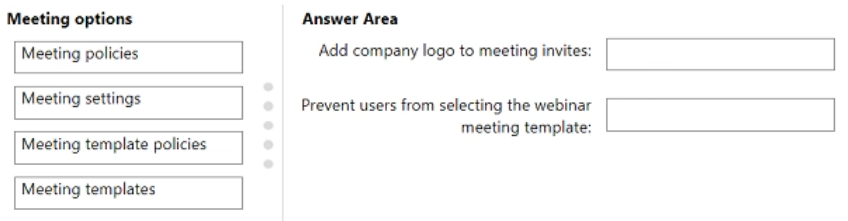
Move each item to the matching row:
- Meeting policies
- Meeting settings
- Meeting template policies
- Meeting templates
- Add company logo to meeting invites:
- Prevent users from selecting the webinar meeting template:
Show answer
- Add company logo to meeting invites: Meeting settings
- Prevent users from selecting the webinar meeting template: Meeting template policies
WhyEmail invitation customization, including the logo URL, is an org-wide option under Meeting settings. Meeting template policies decide which templates are hidden from users in the Teams client, so a policy can hide the webinar template.
- Your company uses Microsoft Teams live events.
You assign the Producer role to a user named User1 for an upcoming live event.
What action can User1 perform?- AInvite attendees.
- BSelect a production method.
- CShare a participant's video.
- DSet the event group members.
Show answer
Correct answer: C
WhyA live event producer controls the event: starting and stopping it, and sharing participants' video or content to attendees. Inviting attendees, choosing the production method and setting group members are done by the organizer when scheduling the event.
- A
- DRAG DROP
You have a Microsoft Teams Phone deployment.
You need to configure voice routing for Direct Routing. The solution must only allow calling within the United States and Canada for a user named [email protected].
Which four actions should you perform in sequence to minimize user call disruption? To answer, move the appropriate actions from the list of actions to the answer area and arrange them in the correct order.
NOTE: More than one order of answer choices is correct. You will receive credit for any of the correct orders you select.
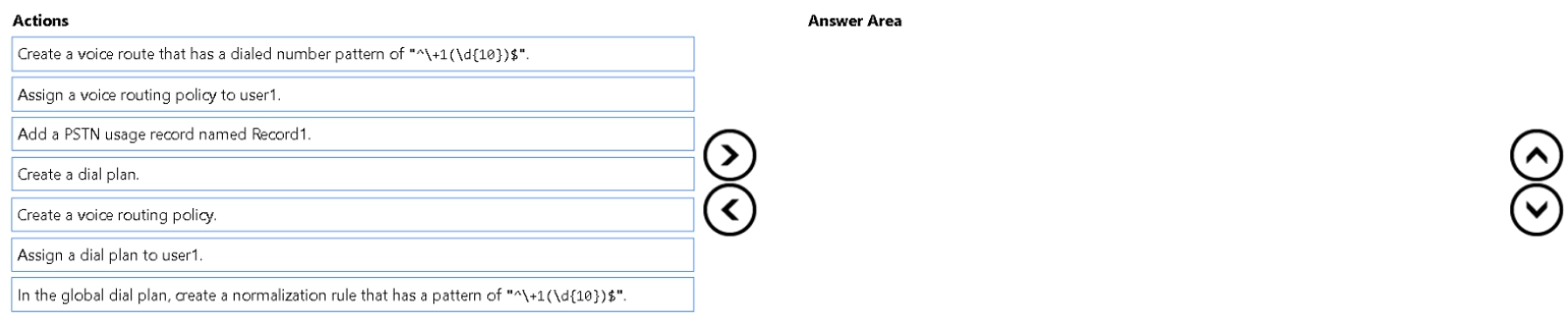
Arrange 4 of these in the correct order:
- Create a voice route that has a dialed number pattern of "^\+1(\d{10})$".
- Assign a voice routing policy to user1.
- Add a PSTN usage record named Record1.
- Create a dial plan.
- Create a voice routing policy.
- Assign a dial plan to user1.
- In the global dial plan, create a normalization rule that has a pattern of "^\+1(\d{10})$".
Show answer
- Add a PSTN usage record named Record1.
- Create a voice route that has a dialed number pattern of "^\+1(\d{10})$".
- Create a voice routing policy.
- Assign a voice routing policy to user1.
WhyDirect Routing authorization comes from a voice routing policy that links PSTN usages to voice routes; the +1 pattern covers the United States and Canada. Dial plans only normalize numbers. Assigning the policy last avoids disrupting the user's calls.
- You have a Microsoft Teams Phone deployment.
Users report poor audio calls.
You need to investigate which protocol is being used for the affected calls.
Which Call Quality Dashboard (CQD) report should you review?- ARate My Call
- BQuality Drill Down
- CQuality of Experience
- DSummary
Show answer
Correct answer: B
WhyThe Quality Drill Down report in CQD shows per-call details, including the audio transport protocol used. Summary and Rate My Call show aggregate trends or user feedback and do not give protocol detail.
- A
- You have a Microsoft Teams Phone deployment.
You need to recommend a Teams device that meets the following requirements:
• Displays a single-button layout that forwards calls to a specific user
• Supports video by default for the calls
• Displays a custom message
Which type of device should you recommend?- ASIP Gateway
- BTeams panels
- CTeams display
- DTeams phone
Show answer
Correct answer: C
WhyThe exhibit requirements describe a desk device with a touch screen that handles video, calls and chat while the PC is off. A Teams display fits, whereas panels are room-door devices, Teams phones have no video, and SIP Gateway is a service for SIP phones.
- A
- You have a Microsoft Teams deployment.
You are scheduling a company-wide town hall that will use a third-party media company for production. The media company will provide several streaming formats for broadcasting audio and video.
You need to use a streaming format supported by Teams.
What should you use?- ANDI-out
- BHDMI
- CRTMP-In
- DSDI
Show answer
Correct answer: C
WhyRTMP-In is the streaming format Teams supports for externally produced town halls and live events, from a media production service. NDI, SDI and HDMI are hardware interfaces and not supported directly for ingest in the cloud.
- A
- Your on-premises network contains an Active Directory Domain Services (AD DS) domain.
You have a Microsoft Teams deployment.
You are deploying a Teams Rooms on Windows device that is domain-joined.
You discover that the device fails to proceed past the Windows sign-in screen.
You need to ensure that the device can perform auto sign-in.
What should you do?- AFrom the Microsoft Teams Pro Rooms Management portal, enroll the device.
- BChange the admin password.
- CValidate Group Policy exclusions.
- DReset the device.
Show answer
Correct answer: C
WhyA domain-joined Teams Rooms device that stops at the Windows sign-in is usually blocked by Group Policy that stops auto sign-in, so validate the Group Policy exclusions for the device OU. Changing the password, resetting, or enrolling in Pro management does not fix the policy conflict.
- A