

SC-300 sample exam questions
15 exam-style questions for Microsoft SC-300: Identity and Access Administrator, with answers and explanations. Take them as a timed practice exam first if you want a score out of 1000.
- Your network contains an on-premises Active Directory domain that syncs to an Azure Active Directory (Azure AD) tenant.
Users sign in to computers that run Windows 10 and are joined to the domain.
You plan to implement Azure AD Seamless Single Sign-On (Azure AD Seamless SSO).
You need to configure the Windows 10 computers to support Azure AD Seamless SSO.
What should you do?- AConfigure Sign-in options from the Settings app.
- BEnable Enterprise State Roaming.
- CModify the Local intranet Zone settings.
- DInstall the Azure AD Connect Authentication Agent.
Show answer
Correct answer: C
WhySeamless SSO needs the Microsoft Entra URL https://autologon.microsoftazuread-sso.com added to the browser's Local intranet zone, usually by Group Policy, so Kerberos tickets are sent automatically. No authentication agent or Enterprise State Roaming is needed on the client.
- A
- HOTSPOT
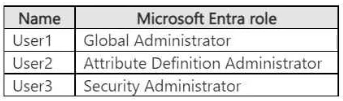
You have a Microsoft Entra tenant that contains the users shown in the following table.
The tenant contains the identities shown in the following table.
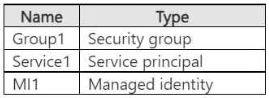
Which users can create custom security attributes, and to which identities can the attributes be assigned? To answer, select the appropriate options in the answer area.
NOTE: Each correct selection is worth one point.
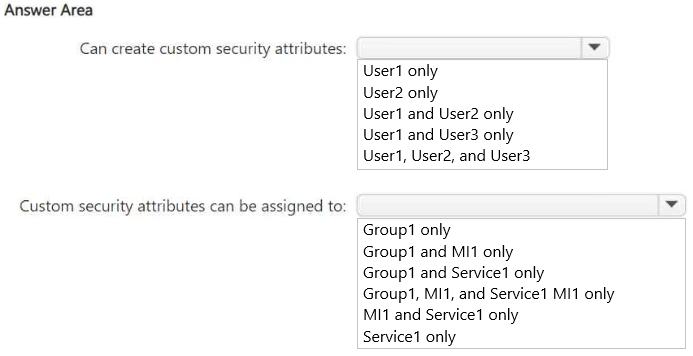
Can create custom security attributes: User1 only / User2 only / User1 and User2 only / User1 and User3 only / User1, User2, and User3 Custom security attributes can be assigned to: Group1 only / Group1 and MI1 only / Group1 and Service1 only / Group1, MI1, and Service1 MI1 only / MI1 and Service1 only / Service1 only Show answer
- Can create custom security attributes: User2 only
- Custom security attributes can be assigned to: MI1 and Service1 only
WhyDefining custom security attributes needs the Attribute Definition Administrator role. Global Administrators don't get it by default. Custom security attributes can be assigned to users, enterprise applications (service principals), and managed identities, but not to groups.
- HOTSPOT
You have an Azure subscription that contains the resources shown in the following table.
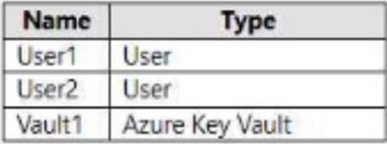
You need to configure access to Vault1. The solution must meet the following requirements:
• Ensure that User1 can manage and create keys in Vault1.
• Ensure that User2 can access a certificate stored in Vault1.
• Use the principle of least privilege.
Which role should you assign to each user? To answer select the appropriate options in the answer area.
NOTE: Each correct selection is worth one point.
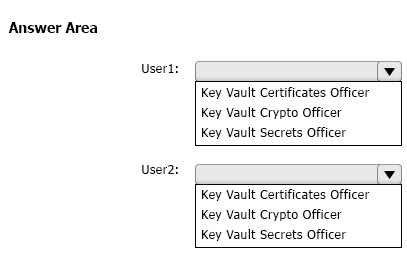
User1: Key Vault Certificates Officer / Key Vault Crypto Officer / Key Vault Secrets Officer User2: Key Vault Certificates Officer / Key Vault Crypto Officer / Key Vault Secrets Officer Show answer
- User1: Key Vault Crypto Officer
- User2: Key Vault Certificates Officer
WhyKey Vault Crypto Officer can do any action on keys, including creating and managing them. Of the roles listed, only Key Vault Certificates Officer gives access to certificates. The narrower Key Vault Certificate User role would be even less privileged, but it isn't offered.
- You have a Microsoft 365 E5 subscription that contains three users named User1, User2, and User3 and a Microsoft SharePoint Online site named Site1.
The subscription contains the devices shown in the following table.
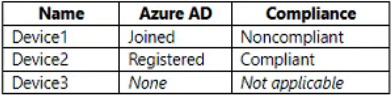
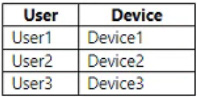
The users sign in to the devices as shown in the following table.
You have a Conditional Access policy that has the following settings:
• Name: CA1
• Assignments
o Users and groups: User1, User2, User3
o Cloud apps or actions: SharePoint - Site1
• Access controls
o Session: Use app enforced restrictions
From the SharePoint admin center, you configure Access control for unmanaged devices to allow limited, web-only access.
Which users will have full access to Site1?- AUser1 only
- BUser2 only
- CUser3only
- DUser1 and User2 only
- EUser1, User2, and User3
Show answer
Correct answer: B
WhySharePoint's unmanaged-device control treats a device as managed only if it is hybrid joined or marked compliant in Intune. Device2 is compliant, so User2 gets full access. Device1 is Entra joined but noncompliant and Device3 is unknown, so User1 and User3 get web-only limited access.
- A
- HOTSPOT
You have an Azure subscription that contains the resources shown in the following table.
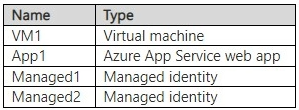
You create a Microsoft Entra user named User1.
Which identities can you add to VM1 and App1? To answer, select the appropriate options in the answer area.
NOTE: Each correct answer is worth one point.
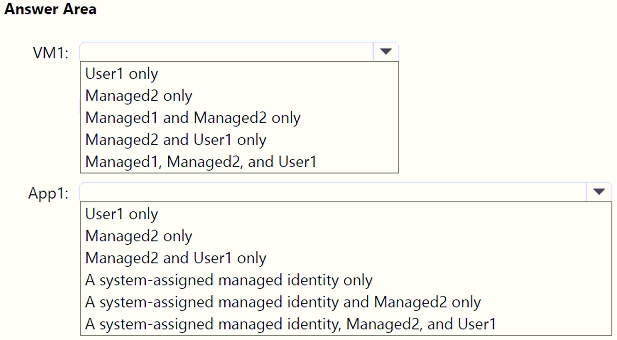
VM1 User1 only / Managed2 only / Managed1 and Managed2 only / Managed2 and User1 only / Managed1, Managed2, and User1 App1 User1 only / Managed2 only / Managed2 and User1 only / A system-assigned managed identity only / A system-assigned managed identity and Managed2 only / A system-assigned managed identity, Managed2, and User1 Show answer
- VM1 Managed1 and Managed2 only
- App1 A system-assigned managed identity and Managed2 only
WhyAzure resources such as VMs and App Service apps accept managed identities only: one system-assigned identity plus any number of user-assigned identities. A regular user account like User1 can never be attached to a resource as its identity.
- You have a Microsoft Entra tenant that contains the identities shown in the following table.
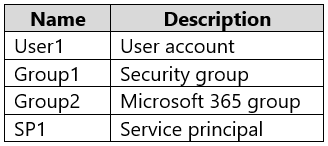
You register an app named App1 in the tenant.
To which identities can you assign the Owner role for App1?- AUser1 only
- BUser1 and Group1 only
- CUser1 and SP1 only
- DUser1, Group1, and Group2 only
- EUser1, Group1, and SP1 only
- FUser1, Groupl, Group2, and SP1
Show answer
Correct answer: C
WhyThe community answer is likely wrong. Microsoft Graph documents that application owners can be individual users or service principals. Groups, whether security or Microsoft 365, cannot be owners of an app registration. User1 and SP1 can therefore be owners of App1, although the portal only offers users.
- A
- DRAG DROP
You have a Microsoft 365 E5 subscription.
You need to perform the following tasks:
• Identify the locations and IP addresses used by Azure AD users to sign in.
• Review the Azure AD security settings and identify improvement recommendations.
• Identify changes to Azure AD users or service principals.
What should you use for each task? To answer, drag the appropriate resources to the correct requirements. Each resource may be used once, more than once, or not at all. You may need to drag the split bar between panes or scroll to view content.
NOTE: Each correct selection is worth one point.
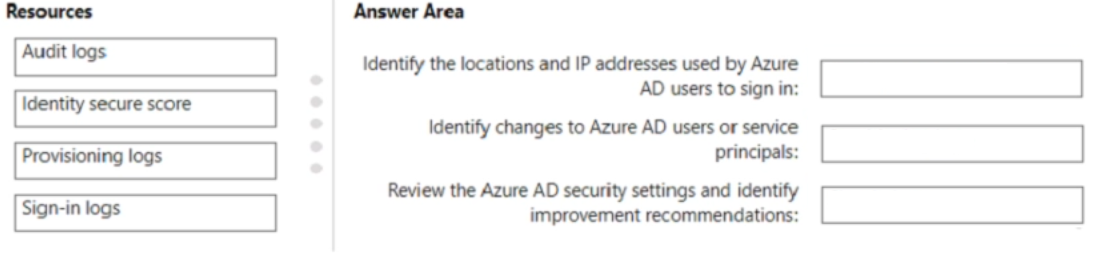
Move each item to the matching row:
- Audit logs
- Identity secure score
- Provisioning logs
- Sign-in logs
- Identify the locations and IP addresses used by Azure AD users to sign in:
- Identify changes to Azure AD users or service principals:
- Review the Azure AD security settings and identify improvement recommendations:
Show answer
- Identify the locations and IP addresses used by Azure AD users to sign in: Sign-in logs
- Identify changes to Azure AD users or service principals: Audit logs
- Review the Azure AD security settings and identify improvement recommendations: Identity secure score
WhySign-in logs record each sign-in's IP address and location. Audit logs record directory changes to objects such as users and service principals. Identity secure score measures your security configuration against best practices and lists improvement actions.
- You have an Azure subscription that contains a registered app named App1.
You need to review the sign-in activity for App1. The solution must meet the following requirements:
• Identify the number of failed sign-ins.
• Identify the success rate of sign-ins.
• Minimize administrative effort.
What should you use?- ASign-in logs
- BAccess reviews
- CAudit logs
- DUsage & insights
Show answer
Correct answer: D
WhyUsage and insights for enterprise applications shows sign-in counts, success rate, and failures per app out of the box, so it needs the least effort. Sign-in and audit logs hold raw events that you would have to filter and calculate yourself; access reviews are unrelated.
- A
- You have an Azure AD Premium P2 tenant.
You create a Log Analytics workspace.
You need to ensure that you can view Azure AD audit log information by using Azure Monitor.
What should you do first?- AModify the Diagnostics settings for Azure AD.
- BRun the Update-MgOrganization cmdlet.
- CRun the Update-MgDomain cmdlet.
- DCreate an Azure AD workbook.
Show answer
Correct answer: A
WhyTo send Azure AD audit logs to Log Analytics for use with Azure Monitor, first configure Diagnostic settings in Azure AD and choose the workspace as destination. The Update-Mg cmdlets change organization or domain properties, and a workbook only works after the logs flow.
- A
- HOTSPOT
You have an Azure subscription named Sub1.
You plan to deploy Microsoft Entra Permissions Management.
You need to ensure that Permission Management can onboard Sub1. The solution must follow the principle of least privilege.
How should you complete the PowerShell command? To answer, select the appropriate options in the answer area.
NOTE: Each correct selection is worth one point.

Command: New-AzRoleAssignment / New-AzRoleDefinition / New-AzTag -RoleDefinitionName Contributor / Owner / Reader Show answer
- Command: New-AzRoleAssignment
- -RoleDefinitionName Reader
WhyOnboarding an Azure subscription requires assigning the existing Reader role to the Cloud Infrastructure Entitlements Management application, so New-AzRoleAssignment is used rather than creating a role. Reader lets it collect permission data with least privilege. Outdated: Microsoft has retired Entra Permissions Management.
- You need to sync the ADatum users. The solution must meet the technical requirements.
What should you do?- AFrom the Microsoft Azure Active Directory Connect wizard, select Customize synchronization options.
- BFrom PowerShell, run Set-ADSyncScheduler.
- CFrom PowerShell, run Start-ADSyncSyncCycle.
- DFrom the Microsoft Azure Active Directory Connect wizard, select Change user sign-in.
Show answer
Correct answer: A
WhyTo sync only the required ADatum users, rerun the Entra Connect wizard and choose Customize synchronization options to filter by domain or OU. Start-ADSyncSyncCycle only triggers a run and Set-ADSyncScheduler changes timing, while Change user sign-in alters the sign-in method.
- A
- You need to meet the authentication requirements for leaked credentials.
What should you do?- AEnable password hash synchronization in Azure AD Connect.
- BConfigure Azure AD Password Protection.
- CConfigure an authentication method policy in Azure AD.
- DEnable federation with PingFederate in Azure AD Connect.
Show answer
Correct answer: A
WhyLeaked credentials detection in Identity Protection works by comparing credentials against leaked data and requires password hash synchronization from Azure AD Connect. Password Protection blocks weak passwords, authentication method policies set methods, and PingFederate federation would not provide the hashes.
- A
- You need to configure the MFA settings for users who connect from the Boston office. The solution must meet the authentication requirements and the access
requirements.
What should you include in the configuration?- Anamed locations that have a private IP address range
- Bnamed locations that have a public IP address range
- Ctrusted IPs that have a public IP address range
- Dtrusted IPs that have a private IP address range
Show answer
Correct answer: B
WhyConditional Access uses named locations defined with public IP ranges, which is the way to identify the Boston office for MFA exemptions. Private ranges cannot be seen by Entra ID, and trusted IPs are a legacy per-user MFA setting that does not fit the stated requirements.
- A
- You need to modify the settings of the User administrator role to meet the technical requirements.
Which two actions should you perform for the role? Each correct answer presents part of the solution.
NOTE: Each correct selection is worth one point.- ASelect Require justification on activation.
- BSelect Require ticket information on activation.
- CModify the Expire eligible assignments after setting.
- DSet all assignments to Eligible.
- ESet all assignments to Active.
Show answer
Correct answer: A, D
WhyUsers must request permission when needed, so set all assignments to Eligible so activation through PIM is required. Requiring justification supports the request. The community answer AD is kept, though modifying the eligible expiry could also fit a one-year limit.
- A
- You need to configure the detection of multi-staged attacks to meet the monitoring requirements.
What should you do?- ACustomize the Microsoft Sentinel rule logic.
- BCreate a workbook.
- CAdd Microsoft Sentinel data connectors.
- DAdd an Microsoft Sentinel playbook.
Show answer
Correct answer: A
WhyMulti-stage attack detection in Microsoft Sentinel comes from the Fusion rule, and its logic is adjusted by customizing the analytics rule. Data connectors only ingest data, workbooks only visualize, and playbooks respond after an incident rather than detecting.
- A