

SC-401 sample exam questions
15 exam-style questions for Microsoft SC-401: Information Security Administrator, with answers and explanations. Take them as a timed practice exam first if you want a score out of 1000.
- You have a Microsoft 365 E5 subscription.
You need to enable support for sensitivity labels in Microsoft SharePoint Online.
What should you use?- Athe Microsoft Purview portal
- Bthe Microsoft Entra admin center
- Cthe SharePoint admin center
- Dthe Microsoft 365 admin center
Show answer
Correct answer: A
WhySensitivity labels support for SharePoint and OneDrive is turned on in the Microsoft Purview portal, under Information Protection label settings (Enable sensitivity labels for Office files in SharePoint and OneDrive). The other admin centers do not host this setting.
- A
- HOTSPOT
You have a Microsoft 365 E5 subscription that uses Microsoft Purview.
You need to create a sensitive information type (SIT) to detect project code content that starts with the letters pjt followed by six digits and ends with the letters sct. The following is an example of the project code.
pjt123456sct
How should you complete the regular expression? To answer, select the appropriate options in the answer area.
NOTE: Each correct selection is worth one point.
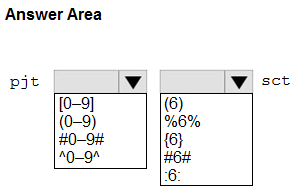
pjt ___ (first box) [0–9] / (0–9) / #0–9# / ^0–9^ ___ sct (second box) (6) / %6% / {6} / #6# / :6: Show answer
- pjt ___ (first box) [0–9]
- ___ sct (second box) {6}
WhyIn a regular expression, [0-9] is a character class that matches any single digit, and the quantifier {6} repeats it exactly six times. So pjt[0-9]{6}sct matches values such as pjt123456sct.
- You have a Microsoft 365 E5 subscription that contains thee users named User1, User2, and User3 and a file named File1.docx.
You create a sensitivity label named Label1 as shown in the following exhibit.
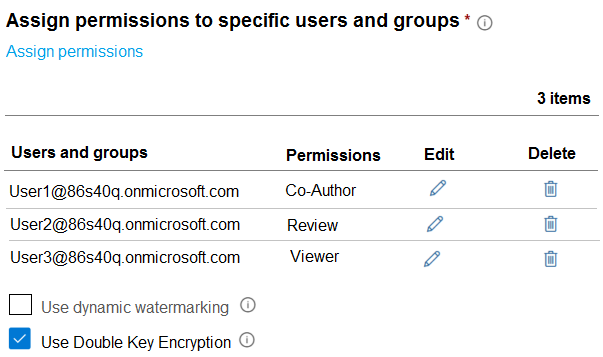
You apply Label1 to File1.
For which users can Microsoft 365 Copilot summarize File1?- ANo user
- BUser1 only
- CUser1 and User2 only
- DUser1, User2, and User3
Show answer
Correct answer: A
WhyLabel1 uses Double Key Encryption. Content protected with DKE is not accessible to Microsoft 365 Copilot, because Microsoft cannot decrypt it, so Copilot cannot summarize the file for any user regardless of Co-Author, Review or Viewer permissions.
- A
- HOTSPOT
You have a Microsoft 365 E5 subscription that contains four users named User1, User2, User3, and User4 and a file named File1.docx.
To File1, you apply a sensitivity label that has the permissions shown in the following exhibit.
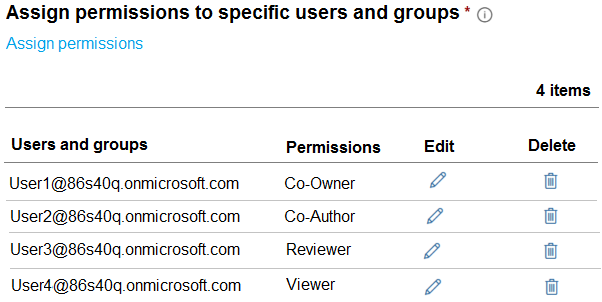
Use the drop-down menus to select the answer choice that completes each statement based on the information presented in the graphic.
NOTE: Each correct selection is worth one point.
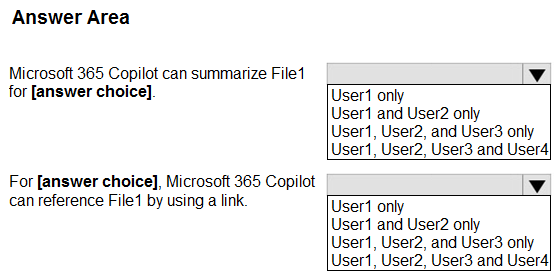
Microsoft 365 Copilot can summarize File1 for [answer choice]. User1 only / User1 and User2 only / User1, User2, and User3 only / User1, User2, User3 and User4 For [answer choice], Microsoft 365 Copilot can reference File1 by using a link. User1 only / User1 and User2 only / User1, User2, and User3 only / User1, User2, User3 and User4 Show answer
- Microsoft 365 Copilot can summarize File1 for [answer choice]. User1 and User2 only
- For [answer choice], Microsoft 365 Copilot can reference File1 by using a link. User1, User2, User3 and User4
WhyCopilot can summarize encrypted content only for users who have both the VIEW and EXTRACT usage rights. Co-Owner and Co-Author include EXTRACT, while Reviewer and Viewer do not. Any user with VIEW rights can still get a link to the file from Copilot.
- You have a Microsoft 365 tenant that is opt-in for trainable classifiers.
You need to ensure that a user named User1 can create custom trainable classifiers. The solution must use the principle of least privilege.
Which role should you assign to User1?- ASecurity Administrator
- BCompliance Administrator
- CGlobal Administrator
- DSecurity Operator
Show answer
Correct answer: B
WhyWith opt-in tenants, Compliance Administrator is the least privileged listed role that can create and manage custom trainable classifiers. Global Administrator is excessive, and Security Administrator and Security Operator lack the needed compliance permissions.
- A
- You have a Microsoft 365 E5 subscription.
You create a sensitivity label named Label1 and publish Label1 to all users and groups.
You have the following files in a SharePoint site:
• File1.doc
• File2.docx
• File3.xlsx
• File4.txt
You need to identify which files can have Label1 applied.
Which files should you identify?- AFile2.docx only
- BFile2.docx and File3.xlsx only
- CFile1.doc, File2.docx, and File3.xlsx only
- DFile1.doc, File2.doc, File3.xlsx, and File4.txt
Show answer
Correct answer: B
WhySensitivity labels apply natively to modern Office formats such as .docx and .xlsx. The legacy .doc format and plain .txt files are not supported by built-in labeling in the Office apps, so only File2 and File3 can have Label1 applied.
- A
- You have a Microsoft 365 E5 tenant.
You create a data loss prevention (DLP) policy.
You need to ensure that the policy protects documents in Microsoft Teams chat sessions.
Which location should you enable in the policy?- ASharePoint sites
- BTeams chat and channel messages
- CExchange email
- DOneDrive accounts
Show answer
Correct answer: D
WhyThe Teams chat and channel messages location covers message text only. Files shared in Teams chats are stored in the sender's OneDrive account, so a DLP policy must include the OneDrive accounts location to protect documents shared in chats. Channel files would sit in SharePoint.
- A
- HOTSPOT
You have a Microsoft 365 E5 subscription that uses Microsoft Purview and just-in-time (JIT) protection. Fallback action in case of failure is set to Block users from completing actions.
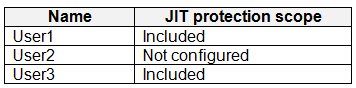
The subscription contains the users shown in the following table.
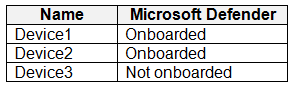
The subscription contains the devices shown in the following table.
The devices contain the files shown in the following table.

For each of the following statements, select Yes if the statement is true. Otherwise, select No.
NOTE: Each correct selection is worth one point.
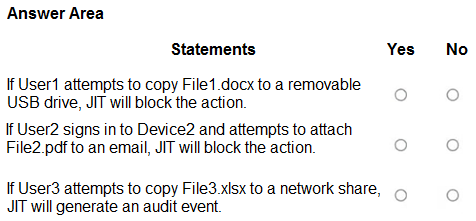
If User1 attempts to copy File1.docx to a removable USB drive, JIT will block the action. Yes / No If User2 signs in to Device2 and attempts to attach File2.pdf to an email, JIT will block the action. Yes / No If User3 attempts to copy File3.xlsx to a network share, JIT will generate an audit event. Yes / No Show answer
- If User1 attempts to copy File1.docx to a removable USB drive, JIT will block the action. Yes
- If User2 signs in to Device2 and attempts to attach File2.pdf to an email, JIT will block the action. No
- If User3 attempts to copy File3.xlsx to a network share, JIT will generate an audit event. No
WhyJIT protection applies only to in-scope users on onboarded devices and holds egress actions on files not yet evaluated. User1 and File1 qualify, so the copy is blocked. User2 is out of scope and File2 is already evaluated, and Device3 is not onboarded, so JIT does nothing there.
- HOTSPOT
You create a retention label policy named Contoso Policy that contains the following labels:
10 years then delete
5 years then delete
Do not retain
Contoso_Policy is applied to content in Microsoft SharePoint Online sites.
After a couple of days, you discover the following messages on the Properties page of the label policy:
• Status: Off (Error)
• It’s taking longer than expected to deploy the policy
You need to reinitiate the policy.
How should you complete the command? To answer, select the appropriate options in the answer area.
NOTE: Each correct selection is worth one point.
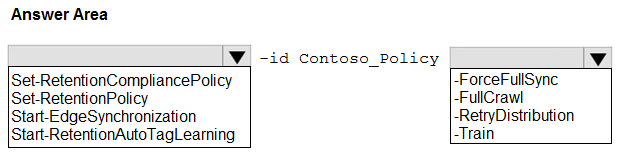
Cmdlet (before -id Contoso_Policy): Set-RetentionCompliancePolicy / Set-RetentionPolicy / Start-EdgeSynchronization / Start-RetentionAutoTagLearning Parameter (after -id Contoso_Policy): -ForceFullSync / -FullCrawl / -RetryDistribution / -Train Show answer
- Cmdlet (before -id Contoso_Policy): Set-RetentionCompliancePolicy
- Parameter (after -id Contoso_Policy): -RetryDistribution
WhySecurity & Compliance PowerShell's Set-RetentionCompliancePolicy with -RetryDistribution redistributes a policy whose deployment failed, which clears the Off (Error) status. Set-RetentionPolicy targets Exchange MRM policies, and the other cmdlets and parameters do not redeploy retention label policies.
- You have a Microsoft 365 subscription.
You plan to retain the following audit log record types and activities for the next three years:
• CopilotInteraction: All activities selected (1/1)
o Interacted with Copilot
• ComplianceDLPEndpoint: All activities selected (2/2)
o Matched DLP rule
o Removed DLP rule from document
• AzureActiveDirectory: 2 of 25 activities selected (2/25)
o Reset user password
o Changed user password
What is the minimum number of audit retention policies you should create to retain only the selected record types and activities?- A1
- B2
- C3
- D5
Show answer
Correct answer: B
WhyAn audit retention policy can include multiple record types, but activity filtering applies to the whole policy. Copilot and DLP endpoint records, with all activities, go in one policy, while the two selected Entra password activities need their own policy. That makes two policies.
- A
- You need to be alerted when users share sensitive documents from Microsoft OneDrive to any users outside your company.
What should you do?- AFrom the Microsoft Entra admin center, configure an Identity Protection policy.
- BFrom the Microsoft Purview portal, start an eDiscovery search.
- CFrom the Microsoft Purview portal, start a data investigation.
- DFrom the Microsoft Purview portal, create a data loss prevention (DLP) policy.
Show answer
Correct answer: D
WhyA DLP policy for OneDrive with a condition that content is shared with people outside the organization and an alert action creates the notification admins need. Identity Protection, eDiscovery and data investigations do not alert in real time on sharing of sensitive documents.
- A
- Note: This question is part of a series of questions that present the same scenario. Each question in the series contains a unique solution that might meet the stated goals. Some question sets might have more than one correct solution, while others might not have a correct solution.
After you answer a question in this section, you will NOT be able to return to it. As a result, these questions will not appear in the review screen.
You have a Microsoft 365 subscription.
You have a user named User1. Several users have full access to the mailbox of User1.
Some email messages sent to User1 appear to have been read and deleted before the user viewed them.
When you search the audit log in the Microsoft Purview portal to identify who signed in to the mailbox of User1, the results are blank.
You need to ensure that you can view future sign-ins to the mailbox of User1.
Solution: You run the Set-AuditConfig –Workload Exchange command.
Does that meet the goal?- AYes
- BNo
Show answer
Correct answer: B
WhySet-AuditConfig -Workload Exchange is not a valid way to enable mailbox sign-in auditing. Mailbox audit logging is enabled per mailbox with Set-Mailbox -AuditEnabled, so this solution does not meet the goal.
- A
- HOTSPOT
You have a Microsoft 365 E5 subscription.
You are implementing insider risk management.
You need to create an insider risk management notice template and format the message body of the notice template.
How should you configure the template? To answer, select the appropriate options in the answer area.
NOTE: Each correct selection is worth one point.
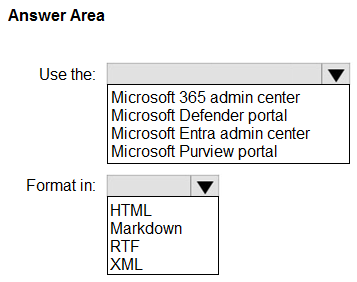
Use the: Microsoft 365 admin center / Microsoft Defender portal / Microsoft Entra admin center / Microsoft Purview portal Format in: HTML / Markdown / RTF / XML Show answer
- Use the: Microsoft Purview portal
- Format in: HTML
WhyInsider risk management notice templates are created under the solution's Notice templates tab in the Microsoft Purview portal. The message body accepts HTML tags for formatting, such as links, headings and bold text, so HTML is the supported format.
- You have a Microsoft 365 E5 subscription.
You plan to use Microsoft Purview insider risk management.
You need to create an insider risk management policy that will detect data theft from Microsoft SharePoint Online by users that submitted their resignation or are near their employment termination date.
What should you do first?- AConfigure Office indicators.
- BOnboard devices to Microsoft Defender for Endpoint.
- CConfigure a Physical badging connector.
- DConfigure a HR data connector.
Show answer
Correct answer: D
WhyDetecting theft by users who resigned or are near termination uses the policy template for data theft by departing users, which relies on a HR connector supplying resignation and termination dates. Office indicators and device onboarding help detection but do not trigger the policy.
- A
- You need to be alerted when users share sensitive documents from Microsoft OneDrive to any users outside your company.
What should you do?- AFrom the Microsoft Defender portal, create a file policy.
- BFrom the Exchange admin center, create a data loss prevention (DLP) policy.
- CFrom the Microsoft Entra admin center, configure an Identity Protection policy.
- DFrom the Microsoft Defender portal, create an activity policy.
Show answer
Correct answer: A
WhyDefender for Cloud Apps file policies scan files in connected apps such as OneDrive and alert on sharing, for example with external users. Activity policies track user actions, not file sharing state, and Exchange DLP or Identity Protection do not cover OneDrive sharing.
- A